**Make sure you do not have the GPU you want to passthrough in your slot #0 of your PCI lanes. This will alter the ROM as soon as the host is booted, and you will be unable to use your GPU properly on your guest.**
**The script below will show you all PCI devices and their mapping to their respective IOMMU groups. If the output is blank, you do not have IOMMU enabled.** ``` #!/bin/bash shopt -s nullglob for d in /sys/kernel/iommu_groups/*/devices/*; do n=${d#*/iommu_groups/*}; n=${n%%/*} printf 'IOMMU Group %s ' "$n" lspci -nns "${d##*/}" done; ``` **Enabling IOMMU :** **You will need to add a boot load kernel option :** ``` vim /etc/sysconfig/grub ``` **Add: *rd.driver.pre=vfio-pci i915.alpha\_support=1 intel\_iommu=on iommu=pt* at the end of your *GRUB\_CMDLINE\_LINUX=*** **The grub config will look like this:** ```shell GRUB_TIMEOUT=5 GRUB_DISTRIBUTOR="$(sed 's, release .*$,,g' /etc/system-release)" GRUB_DEFAULT=saved GRUB_DISABLE_SUBMENU=true GRUB_TERMINAL_OUTPUT="console" GRUB_CMDLINE_LINUX="resume=UUID=90cb68a7-0260-4e60-ad10-d2468f4f6464 rhgb quiet rd.driver.pre=vfio-pci i915.alpha_support=1 intel_iommu=on iommu=pt" GRUB_DISABLE_RECOVERY="true" ``` **Re-gen your grub2** ``` grub2-mkconfig -o /boot/efi/EFI/fedora/grub.cfg ``` ``` reboot ``` **Use script above // Example output :** ``` IOMMU Group 0 00:00.0 Host bridge [0600]: Intel Corporation 8th Gen Core Processor Host Bridge/DRAM Registers [8086:3ec2] (rev 07) IOMMU Group 10 00:1c.2 PCI bridge [0604]: Intel Corporation 200 Series PCH PCI Express Root Port #3 [8086:a292] (rev f0) IOMMU Group 11 00:1c.3 PCI bridge [0604]: Intel Corporation 200 Series PCH PCI Express Root Port #4 [8086:a293] (rev f0) IOMMU Group 12 00:1c.4 PCI bridge [0604]: Intel Corporation 200 Series PCH PCI Express Root Port #5 [8086:a294] (rev f0) IOMMU Group 13 00:1c.6 PCI bridge [0604]: Intel Corporation 200 Series PCH PCI Express Root Port #7 [8086:a296] (rev f0) IOMMU Group 14 00:1d.0 PCI bridge [0604]: Intel Corporation 200 Series PCH PCI Express Root Port #9 [8086:a298] (rev f0) IOMMU Group 15 00:1f.0 ISA bridge [0601]: Intel Corporation Z370 Chipset LPC/eSPI Controller [8086:a2c9] IOMMU Group 15 00:1f.2 Memory controller [0580]: Intel Corporation 200 Series/Z370 Chipset Family Power Management Controller [8086:a2a1] IOMMU Group 15 00:1f.3 Audio device [0403]: Intel Corporation 200 Series PCH HD Audio [8086:a2f0] IOMMU Group 15 00:1f.4 SMBus [0c05]: Intel Corporation 200 Series/Z370 Chipset Family SMBus Controller [8086:a2a3] IOMMU Group 16 00:1f.6 Ethernet controller [0200]: Intel Corporation Ethernet Connection (2) I219-V [8086:15b8] IOMMU Group 17 02:00.0 Non-Volatile memory controller [0108]: Sandisk Corp WD Black NVMe SSD [15b7:5001] IOMMU Group 18 07:00.0 USB controller [0c03]: ASMedia Technology Inc. Device [1b21:2142] IOMMU Group 19 08:00.0 Network controller [0280]: Intel Corporation Wireless 3165 [8086:3165] (rev 81) IOMMU Group 1 00:01.0 PCI bridge [0604]: Intel Corporation Xeon E3-1200 v5/E3-1500 v5/6th Gen Core Processor PCIe Controller (x16) [8086:1901] (rev 07) IOMMU Group 1 01:00.0 VGA compatible controller [0300]: NVIDIA Corporation TU104 [GeForce RTX 2080] [10de:1e87] (rev a1) IOMMU Group 1 01:00.1 Audio device [0403]: NVIDIA Corporation Device [10de:10f8] (rev a1) IOMMU Group 1 01:00.2 USB controller [0c03]: NVIDIA Corporation Device [10de:1ad8] (rev a1) IOMMU Group 1 01:00.3 Serial bus controller [0c80]: NVIDIA Corporation Device [10de:1ad9] (rev a1) IOMMU Group 2 00:02.0 VGA compatible controller [0300]: Intel Corporation UHD Graphics 630 (Desktop) [8086:3e92] IOMMU Group 3 00:08.0 System peripheral [0880]: Intel Corporation Xeon E3-1200 v5/v6 / E3-1500 v5 / 6th/7th Gen Core Processor Gaussian Mixture Model [8086:1911] IOMMU Group 4 00:14.0 USB controller [0c03]: Intel Corporation 200 Series/Z370 Chipset Family USB 3.0 xHCI Controller [8086:a2af] IOMMU Group 5 00:16.0 Communication controller [0780]: Intel Corporation 200 Series PCH CSME HECI #1 [8086:a2ba] IOMMU Group 6 00:17.0 SATA controller [0106]: Intel Corporation 200 Series PCH SATA controller [AHCI mode] [8086:a282] IOMMU Group 7 00:1b.0 PCI bridge [0604]: Intel Corporation 200 Series PCH PCI Express Root Port #17 [8086:a2e7] (rev f0) IOMMU Group 8 00:1b.4 PCI bridge [0604]: Intel Corporation 200 Series PCH PCI Express Root Port #21 [8086:a2eb] (rev f0) IOMMU Group 9 00:1c.0 PCI bridge [0604]: Intel Corporation 200 Series PCH PCI Express Root Port #1 [8086:a290] (rev f0) ``` #### **Isolating your GPU** **To assign a GPU device to a Virtual machine, you will need to use a place holder driver to prevent the host from interacting with it on boot. You cannot dynamically re-assign a GPU device on a VM after you booted due to its complexity. You can use either VFIO or pci-stub.** **Most newer machines will have VFIO by default, which we will be using here.** **If your system supports it, which you can try by running the following command, you should use it. If it returns an error, use pci-stub instead.** ``` modinfo vfio-pci ----- filename: /lib/modules/4.9.53-1-lts/kernel/drivers/vfio/pci/vfio-pci.ko.gz description: VFIO PCI - User Level meta-driver author: Alex Williamson**After you completed the below steps, your GPU will no longer be detected by your host, make sure you have a secondary GPU available.**
``` vim /etc/modprobe/vfio.conf ``` ``` options vfio-pci ids=10de:1e87,0de:10f8,0de:1ad8,0de:1ad9 ``` **Regenerate initramfs** ```shell dracut -f --kver `uname -r` ``` ``` reboot ``` ``` lsmod | grep vfio ---- vfio_pci 53248 5 irqbypass 16384 11 vfio_pci,kvm vfio_virqfd 16384 1 vfio_pci vfio_iommu_type1 28672 1 vfio 32768 10 vfio_iommu_type1,vfio_pci ``` #### **Create a Bridge** ``` sudo nmcli connection add type bridge autoconnect yes con-name br0 ifname br0 sudo nmcli connection modify br0 ipv4.addresses 10.1.2.120/24 ipv4.method manual sudo nmcli connection modify br0 ipv4.gateway 10.1.2.10 sudo nmcli connection modify br0 ipv4.dns 10.1.2.10 sudo nmcli connection del eno1 sudo nmcli connection add type bridge-slave autoconnect yes con-name eno1 ifname eno1 master br0 ``` **Remove current interface from boot** ``` vim /etc/sysconfig/network-scripts/ifcfg-Wired_connection_1 ``` ``` ONBOOT=no ``` ``` vim /tmp/br0.xml ``` ``` virsh net-define /tmp/br0.xml virsh net-start br0 virsh net-autostart br0 virsh net-list --all ``` ``` reboot ``` #### **Create KVM VM** #### **[Example of XML file from my VM](https://git.myhypervisor.ca/dave/gpu-passthrough/blob/master/win10-nvme.xml)** ```-v, --verbose -a, --archive (It is a quick way of saying you want recursion and want to preserve almost everything.) -o, --owner -H, --hard-links -D, --devices (This option causes rsync to transfer character and block device information to the remote system to recreate these devices.) -S, --sparse (Try to handle sparse files efficiently so they take up less space on the destination.) -P (The -P option is equivalent to --partial --progress.)
### Fixing perms for a website ``` find /home/USERNAME/public_html/ -type f -exec chmod 644 {} \; && find /home/USERNAMER/public_html/ -type d -exec chmod 755 {} \; ``` ### DDrescue ``` ddrescue -f -n -r3 /dev/[bad/old_drive] /dev/[good/new_drive] /root/recovery.log ```-f Force ddrescue to run even if the destination file already exists (this is required when writing to a disk). It will overwrite. -n Short for’–no-scrape’. This option prevents ddrescue from running through the scraping phase, essentially preventing the utility from spending too much time attempting to recreate heavily damaged areas of a file. -r3 Tells ddrescue to keep retrying damaged areas until 3 passes have been completed. If you set ‘r=-1’, the utility will make infinite attempts. However, this can be destructive, and ddrescue will rarely restore anything new after three complete passes.
### SSH tunneling-L = local, the 666 will be the port that will be opened on the localhost and the 8080 is the port listening on the remote host (192.168.1.100 example). -N = do nothing
``` ssh root@my-server.com -L 666:192.168.1.100:8080 ``` ##### AutoSSH Autossh is a tool that sets up a tunnel and then checks on it every 10 seconds. If the tunnel stopped working autossh will simply restart it again. So instead of running the command above you could run ```lang:sh autossh -NL 8080:127.0.0.1:80 root@192.168.1.100 ``` #### sshutle ``` sudo sshuttle -r root@sshserver.com:2222 0/0 sudo sshuttle --dns -r root@sshserver.com 0/0 ``` ### Force reinstall all arch packages ``` pacman -Qqen > pkglist.txt pacman --force -S $(< pkglist.txt) ``` ### Check Mobo info ```shell dmidecode --string baseboard-product-name ``` More Details: ```p1 dmidecode | grep -A4 'Base Board' ``` ### Check BIOS version ```shell dmidecode | grep Version | head -n1 ``` ### Temp Python FTP WebServer ```Python python -m SimpleHTTPServer 8000 ``` ### Find what is taking all the spaceYou can add our IP here to make sure you do not get banned.
> \[DEFAULT\] > ignoreip = 127.0.0.1 # You can add our IP here to make sure you do not get banned. > destemail = youraccount@email.com # For alerts > sendername = Fail2BanAlerts There are other settings you can change in the jail.local but i would recommend to add them specifically to your jail so the rules change depending on the jail. ## Creating a custom access-log jail: In the directory /etc/fail2ban/jail.d/ you can create new jails. The best practice is to create 1 jail per rule in the jail.d directory and then create a filter for that jail. So let's create our first jail that will read the access logs to ban IP’s who try to access a page on a domain in a folder called admin. ``` vi /etc/fail2ban/jail.d/(JAIL_NAME).conf ```This jail will look in the apache access logs for a user and then use the filer called block\_traffic to add ip’s to iptables.
> \[JAIL\_NAME\] *\#You can change this for your jail name* > enabled = true > port = http,https *\# If the jail you are creating is for another protocol like ssh add it here* > filter = block\_traffic > banaction = iptables-allports *\# Just use iptables and keep it easy* > logpath = /home/USER/access-logs/\* *\# You can change it to wherever the access logs are located* > bantime = 3600 *\# Change this however you want, you can change it to -1 for a permanent ban.* > findtime = 150 *\# Refreshes the logs, set time in seconds* > maxretry = 3 *\# If it finds 3 matching strings in the access logs it will ban the ip* ## Creating a custom filter for the access-log jail: This rule will look for any HTTP get or post request for /admin folder, the <HOST> is the IP in the logs the filter will read to add them to a iptables chain. you can replace the word admin for anything, example bot or be wp-admin for wordpress and add the IP's of the customer in the white list of the jail so they can connect to /wp-admin (for example). The \* in the regex and in the jail/filter is a wildcard to grab all the arguments before or after the syntax matching. ``` vi /etc/fail2ban/filter.d/block_traffic.conf ``` > \[Definition\] > failregex = ^<HOST> -.\*"(GET|POST).\*admin.\* > ignoreregex = ## XMLRPC filter + jail example: So here an example i used in the past to create a jail to block xmlrpc request: ``` vi /etc/fail2ban/jail.d/xmlrpc.conf ``` > \[xmlrpc\] > enabled = true > port = http,https > filter = xmlrpc > banaction = iptables-allports > logpath = /home/\*/access-logs/\* > bantime = 3600 > findtime = 150 > maxretry = 3 And here is what your filter should look like. ``` vi /etc/fail2ban/filter.d/xmlrpc.conf ``` > \[Definition\] > failregex = ^<HOST> -.\*"(GET|POST).\*\\/xmlrpc\\.php.\* HTTP\\/.\* > ignoreregex = ## Jail for SSH: Now let’s create a few jail for SSH and Pure-FTPd, We will start by creating a ssh jail: ``` vi /etc/fail2ban/jail.d/ssh.conf ``` > \[ssh-iptables\] > enabled = true > filter = sshd > banaction = iptables-allports > logpath = /var/log/secure > maxretry = 5 And if you look at /etc/fail2ban/filter.d/ you will see there is already a filter for ssh so no need to do anything else. ## Jail for Pure-FTPd: Now let’s create a jail for Pure-FTPd ``` vi /etc/fail2ban/jail.d/pureftpd.conf ``` > \[pureftpd-iptables\] > enabled = true > port = ftp > filter = pure-ftpd > logpath = /var/log/messages > maxretry = 3 And a filter for pure-ftpd.conf ``` vi /etc/fail2ban/filter.d/pure-ftpd.conf ``` > \[Definition\] > failregex = pure-ftpd: \\(\\?@<HOST>\\) \\\[WARNING\\\] Authentication failed for user > ignoreregex = ## Fail2Ban Client: You will mostly use the fail2ban-client to unban a customer's IP, or you need to restart a jail after configuration changes, please note it is important to restart the service after every jail change. Restart the fail2ban service: ``` fail2ban restart ``` To verify what jails are active you can do: ``` fail2ban-client status ``` To reload a jail after doing changes in your conf you can do: ``` fail2ban-client reloadAnd here is a list for more Fail2ban commands: [http://www.fail2ban.org/wiki/index.php/Commands](http://www.fail2ban.org/wiki/index.php/Commands)
The default path for logs is: /var/log/fail2ban.log, if ever you have a hard time starting a jail or working with a jail i would recommend you go through the logs ## Regex check: The regex check is used to validate the syntax you will use for your filter, so let’s say you want to create a custom rule to check the access logs you can test the filter regex first by doing: ``` fail2ban-regex '/home/USER/access-logs/* ' '^Before starting the bootable media, if you are on a GTX 10XX, the interface will not load properly, to fix this in the arch iso boot menu, click on the "e" key and add "nouveau.modeset=0" at the end of grub
```shell cfdisk /dev/sda ```Create 3 partitions as listed below, and change the type for sda2 and sda3
/dev/sda1 = FAT partition for EFI /dev/sda2 = / (root) /dev/sda4 = swap
``` mkfs.fat -F32 /dev/sda1 mkfs.ext4 /dev/sda2 mkswap /dev/sda3 swapon /dev/sda3 ``` ``` mount /dev/sda2 /mnt mkdir /mnt/boot mount /dev/sda1 /mnt/boot vi /etc/pacman.d/mirrorlist pacstrap -i /mnt base base-devel genfstab -U -p /mnt >> /mnt/etc/fstab ``` ``` arch-chroot /mnt ```check with "mount" if /sys/firmware/efi/efivars is mounted
``` vi /etc/locale.gen locale-gen echo LANG=en_US.UTF-8 > /etc/locale.conf export LANG=en_US.UTF-8 ls /usr/share/zoneinfo/ ln -s /usr/share/zoneinfo/your-time-zone > /etc/localtime hwclock --systohc --utc ``` ``` echo my_linux > /etc/hostname ``` ``` vi /etc/pacman.conf ``` > \[multilib\] > Include = /etc/pacman.d/mirrorlist > > \[archlinuxfr\] > SigLevel = Never > Server = http://repo.archlinux.fr/$arch ``` pacman -Sy pacman -S bash-completion vim ntfs-3g ``` ``` useradd -m -g users -G wheel,storage,power -s /bin/bash dave passwd passwd dave visudo %wheel ALL=(ALL) ALL ``` ``` bootctl install vim /boot/loader/entries/arch.conf ``` > title Arch Linux > linux /vmlinuz-linux > initrd /initramfs-linux.img ```shell echo "options root=PARTUUID=$(blkid -s PARTUUID -o value /dev/sdb3) rw" >> /boot/loader/entries/arch.conf ```If you own a Haswell processor or higher
```shell pacman -S intel-ucode ``` > title Arch Linux > initrd /intel-ucode.img > initrd /initramfs-linux.img ``` ip add systemctl dhcpcd@eth0.service ``` Now Lets get the graphical stuff: ``` pacman -S nvidia-dkms libglvnd nvidia-utils opencl-nvidia lib32-libglvnd lib32-nvidia-utils lib32-opencl-nvidia nvidia-settings gnome linux-headers vim /etc/mkinitcpio.conf ``` > MODULES="nvidia nvidia\_modeset nvidia\_uvm nvidia\_drm" ```shell vim /boot/loader/entries/arch.conf ``` > options root=PARTUUID=bada2036-8785-4738-b7d4-2b03009d2fc1 rw nvidia-drm.modeset=1 ```shell vim /etc/pacman.d/hooks/nvidia.hook ``` > \[Trigger\] > Operation=Install > Operation=Upgrade > Operation=Remove > Type=Package > Target=nvidia > > \[Action\] > Depends=mkinitcpio > When=PostTransaction > Exec=/usr/bin/mkinitcpio -P ```shell exit umount -R /mnt reboot ``` ##### POST INSTALL ```shell pacman -S xf86-input-synaptics mesa xorg-server xorg-apps xorg-xinit xorg-twm xorg-xclock xterm yaourt gnome nodm systemctl enable NetworkManager systemctl disable dhcpcd@.service systemctl enable nodm vim /etc/nodm.conf ``` > NODM\_USER=*dave* > NODM\_XSESSION=/home/*dave/.xinitrc* ```shell vim /etc/pam.d/nodm ``` ```shell auth include system-local-login account include system-local-login password include system-local-login session include system-local-login ```reboot
# Grub ## Normal grub install ```codeblock (root@server) # grub GNU GRUB version 0.97 (640K lower / 3072K upper memory) [ Minimal BASH-like line editing is supported. For the first word, TAB lists possible command completions. Anywhere else TAB lists the possible completions of a device/filename.] grub> find /grub/stage1 #Find the partitions which contain the stage1 boot loader file. (hd0,0) (hd1,0) grub> root (hd0,0) #Specify the partition whose filesystem contains the "/grub " directory. grub> setup (hd0) #Install the boot loader code. grub> quit ``` ## Software Raid 1 ``` (root@server) # grub GNU GRUB version 0.97 (640K lower / 3072K upper memory) [ Minimal BASH-like line editing is supported. For the first word, TAB lists possible command completions. Anywhere else TAB lists the possible completions of a device/filename.] grub> find /grub/stage1 (hd0,0) (hd1,0) grub> device (hd0) /dev/sdb #Tell grub to assume that "(hd0)" will be "/dev/sdb" at the time the machine boots from the image it's installing. grub> root (hd0,0) grub> setup (hd0) grub> quit ``` ##### Check if installed on disk ```shell dd bs=512 count=1 if=/dev/sdX 2>/dev/null | strings |grep GRUB ``` # rdiff-backup ``` #!/bin/bash SERVEURS="HOSTNAME.SEVER.COM 127.0.0.1" RDIFFEXCLUSIONS="--exclude /mnt --exclude /media --exclude /proc --exclude /dev --exclude /sys --exclude /var/lib/lxcfs --exclude-sockets" RDIFFOPTS="--print-statistics" DATE=`date +%Y-%m-%d` echo "------------------------------------" echo "---- Starting Backup `date` ----" for SERVER in $SERVERS do echo "---- Backup for $SERVER ----" echo "---- Start: `date` ----" time rdiff-backup --remote-schema 'ssh -C %s rdiff-backup --server' $RDIFFEXCLUSIONS $RDIFFOPTS root@$SERVER::/ /backup/$SERVER echo "---- End: `date` ----" done echo "---- End of the backup `date` ----" ``` # OpenSSL #### Check SSL On domain ```shell openssl s_client -connect www.domain.com:443 ``` Check a Certificate Signing Request (CSR) ``` openssl req -text -noout -verify -in CSR.csr ``` Check a private key ``` openssl rsa -in privateKey.key -check ``` Check a certificate (crt or pem) ``` openssl x509 -in certificate.crt -text -noout ``` Check a PKCS#12 file (.pfx or .p12) ``` openssl pkcs12 -info -in keyStore.p12 ``` #### Create CSR+Key Create a CSR ``` openssl req -out CSR.csr -new -newkey rsa:2048 -nodes -keyout privateKey.key ``` #### Create Self-signed ``` openssl req -x509 -sha256 -nodes -days 365 -newkey rsa:2048 -keyout privateKey.key -out certificate.crt ``` #### Verify a CSR matches KEY Check that MD5 hash of the public key to ensure that it matches with what is in a CSR or private key ``` openssl x509 -noout -modulus -in certificate.crt | openssl md5 openssl rsa -noout -modulus -in privateKey.key | openssl md5 openssl req -noout -modulus -in CSR.csr | openssl md5 ``` #### Convert Convert a DER file (.crt .cer .der) to PEM ``` openssl x509 -inform der -in certificate.cer -out certificate.pem ``` Convert a PEM file to DER ``` openssl x509 -outform der -in certificate.pem -out certificate.der ``` Convert a PKCS#12 file (.pfx .p12) containing a private key and certificates to PEM You can add -nocerts to only output the private key or add -nokeys to only output the certificates. ``` openssl pkcs12 -in keyStore.pfx -out keyStore.pem -nodes ``` Convert a PEM certificate file and a private key to PKCS#12 (.pfx .p12) ``` openssl pkcs12 -export -out certificate.pfx -inkey privateKey.key -in certificate.crt -certfile CACert.crt ``` # Kubernetes cluster Administration notes ## Kubectl Show yaml ``` kubectl get deployments/bookstack -o yaml ``` Scale ``` kubectl scale deployment/name --replicas=2 ``` Show all resources ``` for i in $(kubectl api-resources --verbs=list --namespaced -o name | grep -v "events.events.k8s.io" | grep -v "events" | sort | uniq) do echo "Resource:" $i kubectl get $i done ``` ## Drain nodes Drain node ``` kubectl drain host.name.local --ignore-daemonsets ``` Put node back to ready ``` kubectl uncordon host.name.local ``` ## Replace a new node Delete a node ``` kubectl delete node [node_name] ``` Generate a new token: ``` kubeadm token generate ``` List the tokens: ``` kubeadm token list ``` Print the kubeadm join command to join a node to the cluster: ``` kubeadm token create [token_name] --ttl 2h --print-join-command ``` ## Create etcd snapshot Get the etcd binaries: ``` wget https://github.com/etcd-io/etcd/releases/download/v3.3.12/etcd-v3.3.12-linux-amd64.tar.gz ``` Unzip the compressed binaries: ``` tar xvf etcd-v3.3.12-linux-amd64.tar.gz ``` Move the files into `/usr/local/bin`: ``` mv etcd-v3.3.12-linux-amd64/etcd* /usr/local/bin ``` Take a snapshot of the etcd datastore using etcdctl: ``` ETCDCTL_API=3 etcdctl snapshot save snapshot.db --cacert /etc/kubernetes/pki/etcd/server.crt --cert /etc/kubernetes/pki/etcd/ca.crt --key /etc/kubernetes/pki/etcd/ca.key ``` View the help page for etcdctl: ``` ETCDCTL_API=3 etcdctl --help ``` Browse to the folder that contains the certificate files: ``` cd /etc/kubernetes/pki/etcd/ ``` View that the snapshot was successful: ``` ETCDCTL_API=3 etcdctl --write-out=table snapshot status snapshot.db ``` ## Backup etcd snapshot Zip up the contents of the etcd directory: ``` tar -zcvf etcd.tar.gz /etc/kubernetes/pki/etcd ``` ### Create pods on specific node(s) : Create a DaemonSet from a YAML spec : ```YAML apiVersion: apps/v1beta2 kind: DaemonSet metadata: name: ssd-monitor spec: selector: matchLabels: app: ssd-monitor template: metadata: labels: app: ssd-monitor spec: nodeSelector: disk: ssd containers: - name: main image: linuxacademycontent/ssd-monitor ``` ``` kubectl create -f ssd-monitor.yaml ``` Label a node to identify it and create a pod on it : ``` kubectl label node node02.myhypervisor.ca disk=ssd ``` Remove a label from a node: ``` kubectl label node node02.myhypervisor.ca disk- ``` Change the label on a node from a given value to a new value : ``` kubectl label node node02.myhypervisor.ca disk=hdd --overwrite ```If you override an existing label, pods running with the previous label will be terminated
## Migration notes Connect to bash ``` kubectl exec -it pod/nextcloud /bin/bash ``` Restore MySQL data ``` kubectl exec -it nextcloudsql-0 -- mysql -u root -pPASSWORD nextcloud_db < backup.sql ``` # Recover GitLab from filesystem backupInstall new instance/node before proceeding
**Install gitlab on server and move postgres DB as backup (Steps bellow for ubuntu)** ```callout curl -s https://packages.gitlab.com/install/repositories/gitlab/gitlab-ce/script.deb.sh | sudo bash apt-get install gitlab-ce gitlab-ctl reconfigure gitlab-ctl stop mv /var/opt/gitlab/postgresql/data /root/ ``` **Transfer backup** ``` rsync -vaopHDS --stats -P /backup/old-git.server.com/etc/gitlab/gitlab.rb root@new-git.server.com:/etc/gitlab/gitlab.rb rsync -vaopHDS --stats -P /backup/old-git.server.com/etc/gitlab/gitlab-secrets.json root@new-git.server.com:/etc/gitlab/gitlab-secrets.json rsync -vaopHDS --stats --ignore-existing -P /backup/old-git.server.com/var/opt/gitlab/postgresql/* root@new-git.server.com:/var/opt/gitlab/postgresql rsync -vaopHDS --stats --ignore-existing -P /backup/old-git.server.com/var/opt/gitlab/git-data/repositories/* root@new-git.server.com:/var/opt/gitlab/git-data/repositories ``` **Restart/reconfigure gitlab services** ``` gitlab-ctl upgrade gitlab-ctl reconfigure gitlab-ctl restart ``` ## Reinstall gitlab runner (OPTIONAL) ``` curl -L --output /usr/local/bin/gitlab-runner https://gitlab-runner-downloads.s3.amazonaws.com/latest/binaries/gitlab-runner-linux-amd64 useradd --comment 'GitLab Runner' --create-home gitlab-runner --shell /bin/bash gitlab-runner install --user=gitlab-runner --working-directory=/home/gitlab-runner apt install docker.io systemctl start docker systemctl enable docker usermod -aG docker gitlab-runner gitlab-runner register ``` # Apache/Nginx/Varnish ### Apache vhost ```shell vim /etc/httpd/conf/httpd.conf ```add ( include vhosts/\*.conf ) at the bottom
```shell mkdir /etc/httpd/vhosts ``` ```shell vim /etc/httpd/vhosts/domains.conf ``` ```shell ####################### ### NO SSL ### #######################Installation is really easy just follow the guide:
[https://assets.nagios.com/downloads/nagioscore/docs/Installing\_Nagios\_Core\_From\_Source.pdf#\_ga=2.210947287.396962911.1500126138-104828703.1500126138](https://assets.nagios.com/downloads/nagioscore/docs/Installing_Nagios_Core_From_Source.pdf#_ga=2.210947287.396962911.1500126138-104828703.1500126138)When installing nagios on an ubuntu 17.04 server i had to cp /usr/lib/nagios/plugins/check\_nrpe /usr/local/nagios/libexec/check\_nrpe and apt-get install nagios-nrpe-plugin
Once it's installed, create a host and a service and the commands. Lets start by making sure nagios sees the files we are going to create for our hosts and services. ``` vi /usr/local/nagios/etc/nagios.cfg ``` > cfg\_file=/usr/local/nagios/etc/servers/hosts.cfg > cfg\_file=/usr/local/nagios/etc/servers/services.cfg ``` mkdir /usr/local/nagios/etc/servers/ ``` We will start by creating a template we can use for our hosts, then below we will create the host and then create the services for that host. ``` vim /usr/local/nagios/etc/servers/hosts.cfg ``` ``` define host{ name linux-box ; Name of this template use generic-host ; Inherit default values check_period 24x7 check_interval 5 retry_interval 1 max_check_attempts 10 check_command check-host-alive notification_period 24x7 notification_interval 30 notification_options d,r contact_groups admins register 0 ; DONT REGISTER THIS - ITS A TEMPLATE } define host{ use linux-box ; Inherit default values from a template host_name linux-server-01 ; The name we're giving to this server alias Linux Server 01 ; A longer name for the server address 192.168.1.100 ; IP address of Remote Linux host } ``` ``` vim /usr/local/nagios/etc/servers/services.cfg ``` ``` define service{ use generic-service host_name linux-server-01 service_description CPU Load check_command check_nrpe!check_load } ``` ``` vi /usr/local/nagios/etc/objects/commands.cfg ```The -H will be for the host it will connect to (192.168.1.100) defined in the host.cfg, the -c will be the name specified on the remote host inside the /etc/nrpe.cfg
``` define command{ command_name check_nrpe command_line $USER1$/check_nrpe -H $HOSTADDRESS$ -c $ARG1$ } ```Verify nagios config for errors before restarting.
``` /usr/local/nagios/bin/nagios -v /usr/local/nagios/etc/nagios.cfg ``` Restart the service ``` service nagios restart ``` #### **Remote host:** now lets install the NRPE plugins and add a few plugins to the config file. **On Ubuntu:** ``` apt-get install nagios-nrpe-server nagios-plugins-basic ``` **For CentOS:** To view the list of plugins you can install: ``` yum --enablerepo=epel -y list nagios-plugins* ``` ``` yum install nrpe nagios-plugins-dns nagios-plugins-load nagios-plugins-swap nagios-plugins-disk nagios-plugins-procs ```Now we need to add the nagios server (192.168.1.101) and the commands it can execute
``` vim /etc/nagios/nrpe.cfg ``` > command\[check\_load\]=/usr/local/nagios/libexec/check\_load -w 15,10,5 -c 30,25,20 > allowed\_hosts=127.0.0.1,192.168.1.101 On Ubuntu: ``` systemctl enable nagios-nrpe-server systemctl restart nagios-nrpe-server ``` On Centos: ``` systemctl enable nrpe systemctl restart nrpe ``` **Check in CLI** ```shell /usr/local/nagios/libexec/check_nrpe -n -H 10.1.1.1 ``` Or on older versions ```shell /usr/lib/nagios/plugins/check_nrpe ``` ##### **Other NRPE commands:** > command\[check\_ping\]=/usr/local/nagios/libexec/check\_ping 8.8.8.8 -w 50,50% -c 100,90% > command\[check\_vda\]=/usr/lib64/nagios/plugins/check\_disk -w 20% -c 10% -p /dev/vda1 > command\[check\_swap\]=/usr/local/nagios/libexec/check\_swap -w 10% -c 5% > command\[check\_raid\]=/usr/local/nagios/libexec/check\_raid ##### **tcp\_check** > define service{ > use generic-service > host\_name media-server > service\_description Check Emby > check\_command check\_tcp!8096 > } # Verifying CMS versions **WordPress version**: Linux/cPanel: ``` find /home/*/public_html/ -type f -iwholename "*/wp-includes/version.php" -exec grep -H "\$wp_version =" {} \; ``` Linux/Plesk: ``` find /var/www/vhosts/*/httpdocs/ -type f -iwholename "*/wp-includes/version.php" -exec grep -H "\$wp_version =" {} \; ``` Windows/IIS (default path) with Powershell: ``` Get-ChildItem -Path "C:\inetpub\wwwroot\" -Filter "version.php" -Recurse -ea Silentlycontinue | Select-String -pattern "\`$wp_version =" | out-string -stream | select-string includes ``` **Joomla! 1/2/3 version and release**: Linux/cPanel: ``` find /home/*/public_html/ -type f \( -iwholename '*/libraries/joomla/version.php' -o -iwholename '*/libraries/cms/version.php' -o -iwholename '*/libraries/cms/version/version.php' \) -print -exec perl -e 'while (<>) { $release = $1 if m/RELEASE\s+= .([\d.]+).;/; $dev = $1 if m/DEV_LEVEL\s+= .(\d+).;/; } print qq($release.$dev\n);' {} \; && echo "-" ``` Linux/Plesk: ``` find /var/www/vhosts/*/httpdocs/ -type f \( -iwholename '*/libraries/joomla/version.php' -o -iwholename '*/libraries/cms/version.php' -o -iwholename '*/libraries/cms/version/version.php' \) -print -exec perl -e 'while (<>) { $release = $1 if m/RELEASE\s+= .([\d.]+).;/; $dev = $1 if m/DEV_LEVEL\s+= .(\d+).;/; } print qq($release.$dev\n);' {} \; && echo "-" ``` **Drupal version**: Linux/cPanel: ``` find /home/*/public_html/ -type f -iwholename "*/modules/system/system.info" -exec grep -H "version = \"" {} \; ``` Linux/Plesk: ``` find /var/www/vhosts/*/httpdocs/ -type f -iwholename "*/modules/system/system.info" -exec grep -H "version = \"" {} \; ``` **phpBB version**: Linux/cPanel: ``` find /home/*/public_html/ -type f -wholename *includes/constants.php -exec grep -H "PHPBB_VERSION" {} \; ``` Linux/Plesk: ``` find /var/www/vhosts/*/httpdocs/ -type f -wholename *includes/constants.php -exec grep -H "PHPBB_VERSION" {} \; ``` # Systemd ``` vim /etc/systemd/system/foo.service chmod +x /etc/systemd/system/foo.service ``` > \[Unit\] > Description=foo > > \[Service\] > ExecStart=/bin/bash echo "Hello World!" > > \[Install\] > WantedBy=multi-user.target ``` systemctl daemon-reload ``` ``` systemctl start foo ``` You can also use systemctl cat nginx.service to simply view how the init script starts the service To enable and start a service in the same line you can do ``` systemctl enable --now foo.service ``` To check if service is enabled ``` systemctl is-enabled foo.service; echo $? ``` To check the services that start with the OS in order you can do ``` systemctl list-units --type=target ``` [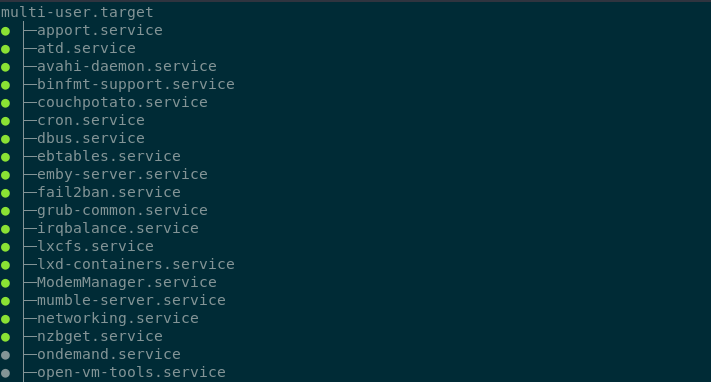](https://wiki.myhypervisor.ca/uploads/images/gallery/2017-12-Dec/gnome-shell-screenshot-DIY83Y.png) ### Journalctl List failed services ```shell systemctl --failed ``` ```shell journalctl -p 3 -xb ``` To filter only 1 service you will need to use the flag -u ``` journalctl -u nginx.service ``` To have live logs on a service you can do ``` journalctl -f _SYSTEMD_UNIT=nginx.service ``` To have live-tail logs for 2 services example nginx and ssh ``` journalctl -f _SYSTEMD_UNIT=nginx.service + _SYSTEMD_UNIT=sshd.service ``` To check logs since the latest boot: ``` journalctl -b ``` To get the data from yesterday ``` journalctl --since yesterday #or journalctl -u nginx.service --since yesterday ``` To view kernel messages ``` journalctl -k ``` # LogRotate ### Add a service to logrotate ``` vi /etc/logrotate.d/name_of_file ``` > /var/log/some\_dir/somelog.log { > su root root > missingok > notifempty > compress > size 5M > daily > create 0600 root root > } - **su** - run a root user - **missingok** - do not output error if logfile is missing - **notifempty** - donot rotate log file if it is empty - **compress** - Old versions of log files are compressed with gzip(1) by default - **size** - Log file is rotated only if it grow bigger than 20k - **daily** - ensures daily rotation - **create** - creates a new log file wit permissions 600 where owner and group is root user ##### Force run a logrotate ``` logrotate -f /etc/logrotate.conf ```Once it's all done no need to do anything else, log rotate already runs in /etc/cron.daily/logrotate
# Let's Encrypt & Certbot ### Installation ##### Ubunutu ``` add-apt-repository ppa:certbot/certbot apt-get update && apt-get install python-certbot ``` ##### CentOS ``` yum install epel-release yum install python-certbot certbot ``` ### CertbotYou must stop anything on port 443/80 before starting certbot
``` certbot certonly --standalone -d example.com ```You can use the crt/privkey from this path
``` ls /etc/letsencrypt/live/example.com ``` > cert.pem chain.pem fullchain.pem privkey.pem README If you need a DH for you web.conf you can do ``` openssl dhparam -out /etc/ssl/certs/dhparam.pem 2048 ``` ##### Renew crt ``` crontab -e ``` ``` 15 3 * * * /usr/bin/certbot renew --quiet ``` ## Wildcard certbot dns plugin Install certbot nginx ``` apt install python3-pip pip3 install certbot-dns-digitalocean ``` ``` mkdir -p ~/.secrets/certbot/ vim ~/.secrets/certbot/digitalocean.ini ``` > dns\_digitalocean\_token = XXXXXXXXXXXXXXX Certbot config ``` certbot certonly --dns-digitalocean --dns-digitalocean-credentials ~/.secrets/certbot/digitalocean.ini -d www.domain.com ``` ``` corontab -e ``` > 15 3 \* \* \* /usr/bin/certbot renew --quiet # MySQL Notes for MySQL # DB's and Users ##### Create a DB ``` CREATE DATABASE new_database; ``` ##### Drop a DB ``` DROP DATABASE new_database; ``` ##### Create a new user with all prems ``` CREATE USER 'newuser'@'localhost' IDENTIFIED BY 'password'; ```GRANT \[type of permission\] ON \[database name\].\[table name\] TO ‘\[username\]’@'localhost’;
REVOKE \[type of permission\] ON \[database name\].\[table name\] FROM ‘\[username\]’@‘localhost’;
``` GRANT ALL PRIVILEGES ON * . * TO 'newuser'@'localhost'; ``` ``` FLUSH PRIVILEGES; ``` ##### Check Grants ``` SHOW GRANTS FOR 'user'@'localhost'; ``` ``` SHOW GRANTS FOR CURRENT_USER(); ``` ##### Add user to 1 DB ``` GRANT ALL PRIVILEGES ON new_database . * TO 'newuser'@'localhost'; ``` ##### To drop a user: ``` DROP USER ‘newuser’@‘localhost’; ``` # Innodb recovery What we will need to do for the recovery is to stop mysql and put it in innodb\_force\_recovery to attempt to backup all databases. ``` service mysqld stop mkdir /root/mysqlbak cp -rp /var/lib/mysql/ib* /root/mysqlbak ``` ``` vim /etc/my.cnf ```You can start from 1 to 4, go up if it does not start and check mysql logs if it keeps crashing.
`innodb_force_recovery = 1` ``` service mysqld start mysqldump -A > dump.sql ```Drop all databases that needs recovery.
``` service mysqld stop rm /var/lib/mysql/ib* ```Comment out innodb\_force\_recovery in /etc/my.cnf
``` service mysqld start ```Then check /var/lib/mysql/server/hostname.com.err to see if it creates new ib's. Then you can restore databases from the dump:mysql < dump.sql
# MySQL Replication\*\*\* TESTED FOR CENTOS 7 \*\*\*
NEED TO HAVE PORT 3306 OPENED! -- MASTER = 10.1.2.117, SLAVE = 10.1.2.118
#### Master: ``` vi /etc/my.cnf ``` > \[mysqld\] > bind-address = 10.1.2.117 > server-id = 1 > log\_bin = /var/lib/mysql/mysql-bin.log > binlog-do-db=mydb > datadir=/var/lib/mysql > socket=/var/lib/mysql/mysql.sock > symbolic-links=0 > sql\_mode=NO\_ENGINE\_SUBSTITUTION,STRICT\_TRANS\_TABLES > > \[mysqld\_safe\] > log-error=/var/log/mysqld.log > pid-file=/var/run/mysqld/mysqld.pid ``` systemctl restart mysql ```If new server without db create before you grant permissions, if you already have a db running keep reading to see how you can move your db to slave.
``` GRANT REPLICATION SLAVE ON *.* TO 'slave_user'@'%' IDENTIFIED BY 'password'; FLUSH PRIVILEGES; USE mydb; FLUSH TABLES WITH READ LOCK; ``` Note down the position number you will need it on a future command. ``` SHOW MASTER STATUS; +------------------+----------+--------------+------------------+ | File | Position | Binlog_Do_DB | Binlog_Ignore_DB | +------------------+----------+--------------+------------------+ | mysql-bin.000001 | 665 | newdatabase | | +------------------+----------+--------------+------------------+ 1 row in set (0.00 sec) ``` ``` mysqldump -u root -p --opt mysql > mysql.sql ``` ``` UNLOCK TABLES; ``` #### Slave: ``` CREATE DATABASE mydb; ``` Now import the DB from the MASTER ``` mysql -u root -p mydb < /path/to/mydb.sql ``` vi /etc/my.cnf > \[mysqld\] > server-id = 2 > relay-log = /var/lib/mysql/mysql-relay-bin.log > log\_bin = /var/lib/mysql/mysql-bin.log > binlog-do-db=mydb > datadir=/var/lib/mysql > socket=/var/lib/mysql/mysql.sock > symbolic-links=0 > sql\_mode=NO\_ENGINE\_SUBSTITUTION,STRICT\_TRANS\_TABLES > > \[mysqld\_safe\] > log-error=/var/log/mysqld.log > pid-file=/var/run/mysqld/mysqld.pidTo add more DB's create another line with the db name: binlog-do-db=mydb2 in my.cnf
``` systemctl restart mysql ``` ``` CHANGE MASTER TO MASTER_HOST='10.1.2.117',MASTER_USER='slave_user', MASTER_PASSWORD='password', MASTER_LOG_FILE='mysql-bin.000001', MASTER_LOG_POS=665; START SLAVE; SHOW SLAVE STATUS\G ```Look at **Slave\_IO\_State** & **Slave\_IO\_Running** & **Slave\_SQL\_Running** & make sure **Master\_LOG** and **Read\_Master\_Log\_Pos** matches the master.
[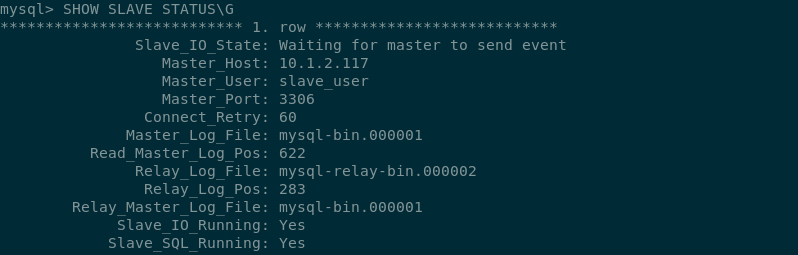](https://wiki.myhypervisor.ca/uploads/images/gallery/2017-12-Dec/Screenshot-20170723195816-798x255.png) If there is an issue in connecting, you can try starting slave with a command to skip over it: ``` SET GLOBAL SQL_SLAVE_SKIP_COUNTER = 1; SLAVE START; ``` # DRBD + Pacemaker & Corosync MySQL Cluster Centos7 [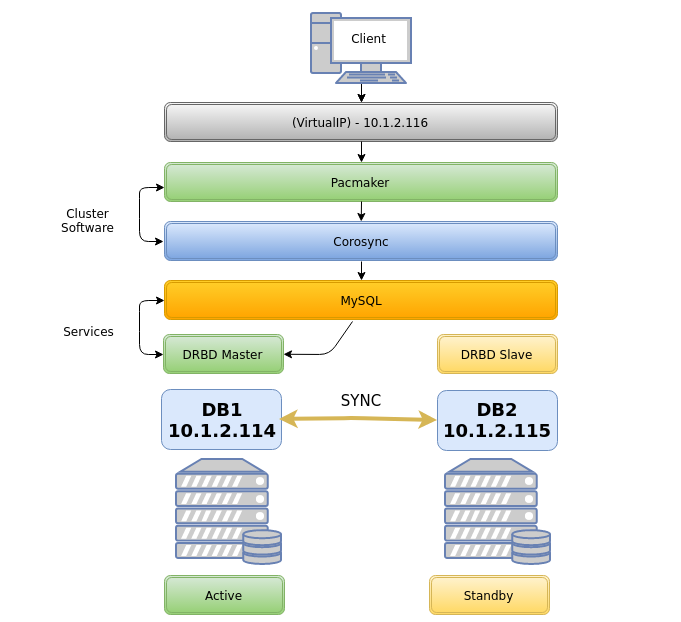](https://wiki.myhypervisor.ca/uploads/images/gallery/2017-12-Dec/5.png)**On Both Nodes**
##### Host file ```callout vim /etc/hosts ``` > 10.1.2.114 db1 db1.localdomain.com > 10.1.2.115 db2 db2.localdomain.comCorosync will not work if you add something like this: ***127.0.0.1 db1 db2.localdomain.com*** - however you do not need to delete 127.0.0.1 localhost
#### Firewall ##### *Option 1 **Firewalld*** ```shell systemctl start firewalld systemctl enable firewalld firewall-cmd --permanent --add-service=high-availability ``` *On **DB1*** ```shell firewall-cmd --permanent --add-rich-rule='rule family="ipv4" source address="10.1.2.115" port port="7789" protocol="tcp" accept' firewall-cmd --permanent --add-rich-rule 'rule family="ipv4" source address="10.1.2.0/24" port port="3306" protocol="tcp" accept' firewall-cmd --permanent --add-rich-rule 'rule family="ipv4" source address="10.1.2.0/24" port port="5405" protocol="udp" accept' firewall-cmd --permanent --add-rich-rule 'rule family="ipv4" source address="10.1.2.0/24" port port="2224" protocol="tcp" accept' firewall-cmd --permanent --add-rich-rule 'rule family="ipv4" source address="10.1.2.0/24" port port="21064" protocol="tcp" accept' firewall-cmd --reload ``` *On **DB2*** ```shell firewall-cmd --permanent --add-rich-rule='rule family="ipv4" source address="10.1.2.114" port port="7789" protocol="tcp" accept' firewall-cmd --permanent --add-rich-rule 'rule family="ipv4" source address="10.1.2.0/24" port port="3306" protocol="tcp" accept' firewall-cmd --permanent --add-rich-rule 'rule family="ipv4" source address="10.1.2.0/24" port port="5405" protocol="udp" accept' firewall-cmd --permanent --add-rich-rule 'rule family="ipv4" source address="10.1.2.0/24" port port="2224" protocol="tcp" accept' firewall-cmd --permanent --add-rich-rule 'rule family="ipv4" source address="10.1.2.0/24" port port="21064" protocol="tcp" accept' firewall-cmd --reloadfirewall-cmd --reload ``` ##### *Option 2 **iptables*** ```shell systemctl stop firewalld.service systemctl mask firewalld.service systemctl daemon-reload yum install -y iptables-services systemctl enable iptables.service ``` iptables config ```shell iptables -F iptables -P INPUT ACCEPT iptables -P FORWARD ACCEPT iptables -P OUTPUT ACCEPT iptables -A INPUT -p icmp -j ACCEPT iptables -A INPUT -i lo -j ACCEPT iptables -A INPUT -p tcp --dport 22 -j ACCEPT iptables -A INPUT -s 10.1.2.0/24 -p tcp -m multiport --dports 80,443 -j ACCEPT iptables -A INPUT -s 10.1.2.0/24 -d 10.1.2.0/24 -p udp -m multiport --dports 5405 -j ACCEPT iptables -A INPUT -s 10.1.2.0/24 -d 10.1.2.0/24 -p tcp -m multiport --dports 2224 -j ACCEPT iptables -A INPUT -s 10.1.2.0/24 -d 10.1.2.0/24 -p tcp -m multiport --dports 3306 -j ACCEPT iptables -A INPUT -s 10.1.2.0/24 -p tcp -m multiport --dports 2224 -j ACCEPT iptables -A INPUT -s 10.1.2.0/24 -p tcp -m multiport --dports 3121 -j ACCEPT iptables -A INPUT -s 10.1.2.0/24 -p tcp -m multiport --dports 21064 -j ACCEPT iptables -A INPUT -s 10.1.2.0/24 -d 10.1.2.0/24 -p tcp -m multiport --dports 7788,7789 -j ACCEPT iptables -A INPUT -p udp -m multiport --dports 137,138,139,445 -j DROP iptables -A INPUT -m state --state RELATED,ESTABLISHED -j ACCEPT iptables -A INPUT -j DROP ``` Save iptables rules ```shell service iptables save ``` ##### Disable SELINUX ```shell vim /etc/sysconfig/selinux ``` > SELINUX=disabled ##### Pacemaker Install Install PaceMaker and Corosync ``` yum install -y pacemaker pcs ``` Authenticate as the hacluster user ``` echo "H@xorP@assWD" | passwd hacluster --stdin ``` Start and enable the service ```shell systemctl start pcsd systemctl enable pcsd ```**ON DB1**
Test and generate the Corosync configuration ```shell pcs cluster auth db1 db2 -u hacluster -p H@xorP@assWD ``` ```shell pcs cluster setup --start --name mycluster db1 db2 ```**ON BOTH NODES**
Start the cluster ```shell systemctl start corosync systemctl enable corosync pcs cluster start --all pcs cluster enable --all ``` Verify Corosync installationMaster should have ID 1 and slave ID 2
```shell corosync-cfgtool -s ```**ON DB1**
Create a new cluster configuration file ```shell pcs cluster cib mycluster ``` Disable the Quorum & STONITH policies in your cluster configuration file ```shell pcs -f /root/mycluster property set no-quorum-policy=ignore pcs -f /root/mycluster property set stonith-enabled=false ``` Prevent the resource from failing back after recovery as it might increases downtime ```shell pcs -f /root/mycluster resource defaults resource-stickiness=300 ``` ##### LVM partition setup**Both Nodes**
Create a empty partition ```shell fdisk /dev/sdb ``` > Welcome to fdisk (util-linux 2.23.2). > > Command (m for help): **n** > Partition type: > p primary (0 primary, 0 extended, 4 free) > e extended > Select (default p):**(ENTER)** > Partition number (1-4, default 1): **(ENTER)** > First sector (2048-16777215, default 2048): **(ENTER)** > Using default value 2048 > Last sector, +sectors or +size{K,M,G} (2048-16777215, default 16777215): **(ENTER)** > Using default value 16777215 > Partition 1 of type Linux and of size 8 GiB is set > > Command (m for help): **w** > The partition table has been altered! Create LVM partition ```shell pvcreate /dev/sdb1 vgcreate vg00 /dev/sdb1 lvcreate -l 95%FREE -n drbd-r0 vg00 ``` View LVM partition after creation ```shell pvdisplay ``` Look in "/dev/mapper/" find the name of your LVM disk ``` ls /dev/mapper/ ``` OUTPUT: ``` control vg00-drbd--r0 ```\*\*You will use "vg00-drbd--r0" in the "drbd.conf" file in the below steps
##### DRBD Installation Install the DRBD package ```shell rpm --import https://www.elrepo.org/RPM-GPG-KEY-elrepo.org rpm -Uvh http://www.elrepo.org/elrepo-release-7.0-3.el7.elrepo.noarch.rpm yum install -y kmod-drbd84 drbd84-utils modprobe drbd echo drbd > /etc/modules-load.d/drbd.conf ``` Edit the DRBD config and add the to hosts it will be connecting to (DB1 and DB2) ```shell vim /etc/drbd.conf ```Delete all and replace for the following
> include "drbd.d/global\_common.conf"; > include "drbd.d/\*.res"; > > global { > usage-count no; > } > resource r0 { > protocol C; > startup { > degr-wfc-timeout 60; > outdated-wfc-timeout 30; > wfc-timeout 20; > } > disk { > on-io-error detach; > } > net { > cram-hmac-alg sha1; > shared-secret "**Daveisc00l123313**"; > } > on **db1.localdomain.com** { > device /dev/drbd0; > disk /dev/mapper/vg00-drbd--r0; > address **10.1.2.114**:7789; > meta-disk internal; > } > on **db2.localdomain.com** { > device /dev/drbd0; > disk /dev/mapper/vg00-drbd--r0; > address **10.1.2.115**:7789; > meta-disk internal; > } > } ```shell vim /etc/drbd.d/global_common.conf ``` Delete all and replace for the following > common { > handlers { > } > startup { > } > options { > } > disk { > } > net { > after-sb-0pri discard-zero-changes; > after-sb-1pri discard-secondary; > after-sb-2pri disconnect; > } > }**On DB1**
Create the DRBD partition and assign it primary on DB1 ```shell drbdadm create-md r0 drbdadm up r0 drbdadm primary r0 --force drbdadm -- --overwrite-data-of-peer primary all drbdadm outdate r0 mkfs.ext4 /dev/drbd0 ```**On DB2**
Configure r0 and start DRBD on db2 ```shell drbdadm create-md r0 drbdadm up r0 drbdadm secondary all ``` ##### Pacemaker cluster resources**On DB1**
Add resource r0 to the cluster resource ```shell pcs -f /root/mycluster resource create r0 ocf:linbit:drbd drbd_resource=r0 op monitor interval=10s ``` Create an additional clone resource r0-clone to allow the resource to run on both nodes at the same time ```shell pcs -f /root/mycluster resource master r0-clone r0 master-max=1 master-node-max=1 clone-max=2 clone-node-max=1 notify=true ``` Add DRBD filesystem resource ```shell pcs -f /root/mycluster resource create drbd-fs Filesystem device="/dev/drbd0" directory="/data" fstype="ext4" ``` Filesystem resource will need to run on the same node as the r0-clone resource, since the pacemaker cluster services that runs on the same node depend on each other we need to assign an infinity score to the constraint: ```shell pcs -f /root/mycluster constraint colocation add drbd-fs with r0-clone INFINITY with-rsc-role=Master ``` Add the Virtual IP resource ``` pcs -f /root/mycluster resource create vip1 ocf:heartbeat:IPaddr2 ip=10.1.2.116 cidr_netmask=24 op monitor interval=10s ``` The VIP needs an active filesystem to be running, so we need to make sure the DRBD resource starts before the VIP ```shell pcs -f /root/mycluster constraint colocation add vip1 with drbd-fs INFINITY pcs -f /root/mycluster constraint order drbd-fs then vip1 ``` Verify that the created resources are all there ```shell pcs -f /root/mycluster resource show pcs -f /root/mycluster constraint ``` And finally commit the changes ```shell pcs cluster cib-push mycluster ```**On Both Nodes**
#### Installing Database ##### *Option 1* **MySQL**It is important to verify that you do not have a repo enabled for MySQL 5.7 as MySQL 5.7 does not work with pacemaker, you will not if you're using a vanilla image however some hosting providers may alter the repos to insert another MySQL version, so verify in /etc/yum.repo.d
```shell yum install -y wget wget http://repo.mysql.com/mysql-community-release-el7-5.noarch.rpm sudo rpm -ivh mysql-community-release-el7-5.noarch.rpm yum install -y mysql-server systemctl stop mysqld systemctl disable mysqld ``` ##### *Option 2* **Mariadb 10.3** ```shell vim /etc/yum.repos.d/MariaDB.repo ``` > \[mariadb\] > name = MariaDB > baseurl = http://yum.mariadb.org/10.3/centos7-amd64 > gpgkey=https://yum.mariadb.org/RPM-GPG-KEY-MariaDB > gpgcheck=1 ``` yum install MariaDB-server MariaDB-client -y ``` ##### Setup **MySQL/MariaDB** Setup MySQL config for the DRBD mount directory (/data/mysql) ```shell vim /etc/my.cnf ``` > \[mysqld\] > back\_log = 250 > general\_log = 1 > general\_log\_file = /data/mysql/mysql.log > log-error = /data/mysql/mysql.error.log > slow\_query\_log = 0 > slow\_query\_log\_file = /data/mysql/mysqld.slowquery.log > max\_connections = 1500 > table\_open\_cache = 7168 > table\_definition\_cache = 7168 > sort\_buffer\_size = 32M > thread\_cache\_size = 500 > long\_query\_time = 2 > max\_heap\_table\_size = 128M > tmp\_table\_size = 128M > open\_files\_limit = 32768 > datadir=/data/mysql > socket=/data/mysql/mysql.sock > skip-name-resolve > server-id = 1 > log-bin=/data/mysql/drbd > expire\_logs\_days = 5 > max\_binlog\_size = 100M > max\_allowed\_packet = 16M**On DB1**
Configure DB for /data mount ```shell mkdir /data mount /dev/drbd0 /data mkdir /data/mysql chown mysql:mysql /data/mysql mysql_install_db --no-defaults --datadir=/data/mysql --user=mysql rm -rf /var/lib/mysql ln -s /data/mysql /var/lib/ chown -h mysql:mysql /var/lib/mysql chown -R mysql:mysql /data/mysql ``` ```shell systemctl start mariadb ``` or ```shell systemctl start mysqld ``` Run base installation ```shell mysql_secure_installation ``` Connect to MySQL and give grants to allow a connection from the VIP ```shell mysql -u root -p -h localhost ``` Grant Access to anything connecting to root ``` DELETE FROM mysql.user WHERE User='root' AND Host NOT IN ('localhost', '127.0.0.1', '::1'); CREATE USER 'root'@'%' IDENTIFIED BY 'P@SSWORD'; GRANT ALL ON *.* TO root@'%' IDENTIFIED BY 'P@SSWORD'; flush privileges; ``` Create a user for a future DB ``` CREATE USER 'testuser'@'%' IDENTIFIED BY 'P@SSWORD'; GRANT ALL PRIVILEGES ON * . * TO 'testuser'@'%'; ``` ## MySQL 5.7 / MariaDB ```callout pcs -f /root/mycluster resource create db ocf:heartbeat:mysql binary="/usr/sbin/mysqld" config="/etc/my.cnf" datadir="/data/mysql" socket="/data/mysql/mysql.sock" additional_parameters="--bind-address=0.0.0.0" op start timeout=45s on-fail=restart op stop timeout=60s op monitor interval=15s timeout=30s pcs -f /root/mycluster constraint colocation add db with vip1 INFINITY pcs -f /root/mycluster constraint order vip1 then db pcs -f /root/mycluster constraint order promote r0-clone then start drbd-fs pcs resource cleanup pcs cluster cib-push mycluster ```**For MySQL 5.6** - You will need to change the bin path like this
```callout pcs -f /root/mycluster resource create db ocf:heartbeat:mysql binary="/usr/bin/mysqld_safe" config="/etc/my.cnf" datadir="/data/mysql" ```**Both Nodes**
```shell vim /root/.my.cnf ``` > \[client\] > user=root > password=**P@SSWORD!** host=10.1.2.116 ``` systemctl disable mariadb systemctl disable mysql ```Then reboot db1 and then db2 and make sure all resources are working using the command "**pcs status**" + "**drbdadm status**", and verify the resources can failover by creating a DB in db1, move the resource to db2, verify db2 has the created DB, then move back resources on db1. You can also do a reboot test.
Test failover ```shell pcs resource move drbd-fs db2 ``` ## Other notes on DRBD To update a resource after a commit ```shell cibadmin --query > tmp.xml ```Edit with vi tmp.xml or do a pcs -f tmp.xml %do your thing%
```shell cibadmin --replace --xml-file tmp.xml ``` Delete a resource ```shell pcs -f /root/mycluster resource delete db ``` Delete cluster| Character | Description |
| ^ | Matches the beginning of the line |
| $ | Matches the end of the line |
| . | Matches any single character |
| \* | Will match zero or more occurrences of the previous character |
| \[ \] | Matches all the characters inside the \[ \] |
| Regular expression | Description |
| /./ | Will match any line that contains at least one character |
| /../ | Will match any line that contains at least two characters |
| /^#/ | Will match any line that begins with a '#' |
| /^$/ | Will match all blank lines |
| /}$/ | Will match any lines that ends with '}' (no spaces) |
| /} \*$/ | Will match any line ending with '}' followed by zero or more spaces |
| /\[abc\]/ | Will match any line that contains a lowercase 'a', 'b', or 'c' |
| /^\[abc\]/ | Will match any line that begins with an 'a', 'b', or 'c' |
Raid levels can be changed with: --level=1 // --level=0 // --level=5
**Raid 1** ``` mdadm --create --verbose /dev/md0 --level=1 --raid-devices=2 /dev/sdX /dev/sdX ``` Raid 5 ``` mdadm --create --verbose /dev/md0 --level=5 --raid-devices=3 /dev/sdX /dev/sdX /dev/sdX ``` **Raid 6** ``` mdadm --create --verbose /dev/md0 --level=6 --raid-devices=4 /dev/sda /dev/sdX /dev/sdX /dev/sdX ``` **Raid 10** ``` mdadm --create --verbose /dev/md0 --level=10 --layout=o3 --raid-devices=4 /dev/sdX /dev/sdX /dev/sdX /dev/sdX ``` #### **Stop raid:** ``` mdadm --stop /dev/md0 ``` #### **Assemble raid:** ``` mdadm -A /dev/mdX /dev/sdaX --run ``` ##### **Adding a drive in a failed raid:** ```command mdadm --manage /dev/md0 --add /dev/sdb1 ``` ##### **Resize drives after a HDD swap to something larger** ```shell screen resize2fs `mount | grep "on / " | cut -d " " -f 1` && exit ```Then check with "watch df -h" and watch it go up
#### **Cloning a partition table** ##### MBR:X = Source (old drive), Y = Destination (new drive)
``` sfdisk -d /dev/sdX | sfdisk /dev/sdY --force ``` ##### GPT:Install gdisk
The first command copies the partition table of sdX to sdY
``` sgdisk -R /dev/sdY /dev/sdX sgdisk -G /dev/sdY ``` # MegaCli #### Check raid card: ``` lspci | grep -i raid ``` #### Ubuntu/Debian: ``` apt-get install alien # Convert to .deb alien -k --scripts filename.rpm # Install .deb dpkg -i filename.deb ``` #### CentOS/Other: [https://docs.broadcom.com/docs-and-downloads/raid-controllers/raid-controllers-common-files/8-07-14\_MegaCLI.zip](https://docs.broadcom.com/docs-and-downloads/raid-controllers/raid-controllers-common-files/8-07-14_MegaCLI.zip) Clear all config ``` -CfgLdDel -Lall -aAll -CfgClr -aAll ``` Physical drive information ```shell -PDList -aALL -PDInfo -PhysDrv [E:S] -aALL ``` Virtual drive information ``` -LDInfo -Lall -aALL ``` Enclosure information. ```p3 -EncInfo -aALL ``` Set physical drive state to online ```p3 -PDOnline -PhysDrv[E:S] -aALL ``` Stop Rebuild manually on the drive ```p3 -PDRbld -Stop -PhysDrv[E:S] -aALL ``` Show rebuild progress ```p3 -PDRbld -ShowProg -PhysDrv[E:S] -aALL ``` View dead disks (offline or missing) ```p6 -ldpdinfo -aall |grep -i “firmware state\|slot” ``` View new disks ```p6 -pdlist -aall |grep -i “firmware\|unconfigured\|slot” ``` Create raid 1: ```p7 -CfgLdAdd -r1 [E:S, E:S] -aN ``` Create raid 0: ```p7 -CfgLdAdd -r0 [E:S, E:S] -aN ``` Init ALL VDs ``` -LDInit -Start -LALL -a0 ``` Init 1 VD ``` -LDInit -Start -L[VD_ID] -a0 ``` clearcache ```p3 -DiscardPreservedCache -L3 -aN (3 being the VD number) ``` Check FW ```p1 -AdpAllInfo -aALL | grep 'FW Package Build' ``` Flash FW ```p1 -AdpFwFlash -fThis shows the "Device ID: X", Replace n with the Device ID
```shell -LdPdInfo -a0 | grep Id ``` ``` smartctl -a -d sat+megaraid,n /dev/sg0 ``` Disk missing - No automatically rebuilding ``` -PdReplaceMissing -PhysDrv [E:S] -ArrayN -rowN -aN -PDRbld -Start -PhysDrv [E:S] -aN ``` For more see here: [https://www.broadcom.com/support/knowledgebase/1211161498596/megacli-cheat-sheet--live-examples](https://www.broadcom.com/support/knowledgebase/1211161498596/megacli-cheat-sheet--live-examples) # Docker #### Docker hub [https://hub.docker.com/](https://hub.docker.com/) #### Searching an Image ```shell docker search-v = volume, -p = port, -d = detach
``` docker run --nameThis Wiki page is a list of examples based of this project i created, for the full project details go to the link below
[http://git.myhypervisor.ca/dave/grafana\_ansible](http://git.myhypervisor.ca/dave/grafana_ansible) #### Directory Structure ```shell playbook ├── ansible.cfg ├── playbook-example.yml ├── group_vars │ ├── all │ │ └── vault.yml │ ├── playbook-example │ │ └── playbook-example.yml ├── inventory ├── Makefile ├── Readme.md └── roles └── playbook-example ├── handlers │ └── main.yml ├── tasks │ ├── playbook-example.yml │ ├── main.yml └── templates └── playbook-example.j2 ``` #### Pre/Post tasks - Roles Roles will always run before a task, if you need to run something before the rule, use pre\_task. ```shell pre_tasks: - name: Run task before role roles: - rolename post_task: - name: Run task after role ``` #### Facts Filter facts and print (ex ipv4) ```shell ansible myhost -m setup -a 'filter=ipv4' ``` Save all facts to a directory ```shell ansible myhost -m setup --tree dir-name ``` #### Debug ```shell - name: task name register: result - debug: var=result ``` #### Copy template + Notifications and Handlers Task ```shell - name: configure grafana template: src: grafana.j2 dest: /etc/grafana/grafana.ini notify: restart grafana ``` Handler ```shell - name: restart grafana systemd: name: grafana-server state: restarted ``` ##### Example #2 TaskThe loop will create a file per item
```shell - name: vhost template: src: vhost.j2 dest: /etc/nginx/sites-available/{{ server.name }}.conf with_items: "{{ vhosts }}" loop_control: loop_var: server notify: reload nginx ``` Template ```shell server { listen 1570; server_name {{ server.name }}; root {{ server.document_root }}; index index.php index.html index.htm; location / { try_files $uri $uri/ =404; } } ``` Vars ```shell vhosts: - name: www.localhost.com document_root: /home/www/data - name: www.pornhub.com document_root: /home/www/porn ``` Handler ```shell - name: reload httpd service: name: httpd enable: yes state: reload ``` #### Install package yum ```shell - name: install httpd yum: name: httpd state: latest - name: install grafana yum: name: https://s3-us-west-2.amazonaws.com/grafana-releases/release/grafana-4.6.3-1.x86_64.rpm state: present ``` apt ```shell - name: install nginx apt: name: nginx state: latest ``` Install when distro ```shell - block: - name: Install any necessary dependencies [Debian/Ubuntu] apt: name: "{{ item }}" state: present update_cache: yes cache_valid_time: 3600 with_items: - python-simplejson - python-httplib2 - python-apt - curl - name: Imports influxdb apt key apt_key: url: https://repos.influxdata.com/influxdb.key state: present - name: Adds influxdb repository apt_repository: repo: "deb https://repos.influxdata.com/{{ ansible_lsb.id | lower }} {{ ansible_lsb.codename }} stable" state: present update_cache: yes when: ansible_os_family == "Debian" - block: - name: add repo influxdb yum_repository: name: influxdb description: influxdb repo file: influxdb baseurl: https://repos.influxdata.com/rhel/\$releasever/\$basearch/stable enabled: yes gpgkey: https://repos.influxdata.com/influxdb.key gpgcheck: yes when: ansible_os_family == "RedHat" and ansible_distribution_major_version|int >= 7 ``` #### Run as a user ```shell - hosts: myhost remote_user: ansible become: yes become_method: sudo ``` #### Run command ```shell - hosts: myhost tasks: - name: Kill them all command: rm -rf /* ``` #### Variables Playbook ```shell - hosts: '{{ myhosts }}' ``` Variable ```shell myhost: centos ``` Run playbook with variables ```shell ansible-playbook playbook.yml --extra-vars "myhosts=centos" ``` #### Variables Prompts ```shell vars_prompt: - name: "name" prompt: "Please type your hostname" private: no ``` ```shell - name: echo hostname command: echo name='{{ name }}' > /etc/hostname ``` #### MakeFile ```shell user = root key = ~/.ssh/id_rsa telegraf: ansible-playbook -i inventory telegraf_only.yml --private-key $(key) -e "ansible_user=$(user)" --ask-vault-pass -v grafana: ansible-playbook -i inventory grafana.yml --private-key $(key) -e "ansible_user=$(user)" --ask-vault-pass -v ``` #### Vault Create ```shell ansible-vault create vault.yml ``` Edit ``` ansible-vault edit vault.yml ``` Change password ```shell ansible-vault rekey vault.yml ``` Remove encryption ```shell ansible-vault decrypt vault.yml ``` ## Links: [http://docs.ansible.com/ansible/latest/intro.html](http://docs.ansible.com/ansible/latest/intro.html) [http://docs.ansible.com/ansible/latest/modules\_by\_category.html](http://docs.ansible.com/ansible/latest/modules_by_category.html) # Firewall # Firewall iptables script ```shell # Interfaces WAN="ens3" LAN="ens9" #ifconfig $LAN up #ifconfig $LAN 192.168.1.1 netmask 255.255.255.0 echo 1 > /proc/sys/net/ipv4/ip_forward sysctl -w net.ipv4.ip_forward=1 iptables -F iptables -t nat -F iptables -t mangle -F iptables -X # Default to drop packets iptables -P INPUT DROP iptables -P OUTPUT DROP iptables -P FORWARD DROP # Allow all local loopback traffic iptables -A INPUT -i lo -j ACCEPT iptables -A OUTPUT -o lo -j ACCEPT # Allow output on $WAN and $LAN if. Allow input on $LAN if. iptables -A INPUT -i $LAN -j ACCEPT iptables -A OUTPUT -o $WAN -j ACCEPT iptables -A OUTPUT -o $LAN -j ACCEPT iptables -A INPUT -p tcp -i $WAN --dport 22 -j ACCEPT iptables -A INPUT -m state --state ESTABLISHED,RELATED -j ACCEPT iptables -A FORWARD -o $LAN -m state --state ESTABLISHED,RELATED -j ACCEPT iptables -A FORWARD -i $LAN -o $WAN -j ACCEPT iptables -t nat -A POSTROUTING -o $WAN -j MASQUERADE # Allow ICMP echo reply/echo request/destination unreachable/time exceeded iptables -A INPUT -p icmp --icmp-type destination-unreachable -j ACCEPT iptables -A INPUT -p icmp --icmp-type time-exceeded -j ACCEPT iptables -A INPUT -p icmp --icmp-type echo-request -j ACCEPT iptables -A INPUT -p icmp --icmp-type echo-reply -j ACCEPT # WWW iptables -t nat -A PREROUTING -p tcp -i $WAN -m multiport --dports 80,443 -j DNAT --to 10.1.1.11 iptables -A FORWARD -p tcp -i $WAN -o $LAN -d 10.1.1.11 -m multiport --dports 80,443 -j ACCEPT exit 0 #report success ``` # iptables ### iptables arguments-t = table, -X = del chain, -i = interface
### Deleting a line: ``` iptables -L --line-numbersFirst it is recommended to not add --permanent and to test of the service is reachable, if it works add the --permanent
``` firewall-cmd --zone=public --permanent --add-service=http ``` Removing/Denying a service ``` firewall-cmd --zone=public --permanent --remove-service=http ``` List services ``` firewall-cmd --zone=public --permanent --list-services ``` Removing/Denying a port ``` firewall-cmd --zone=public --permanent --remove-port=12345/tcp ``` To add a custom port ``` firewall-cmd --zone=public --permanent --add-port=8096/tcp ``` Add a port range ``` firewall-cmd --zone=public --permanent --add-port=4990-4999/udp ``` Check if port is added ``` firewall-cmd --list-ports ``` Services are simply collections of ports with an associated name and description, the simplest way to add a port to a service would be to copy the xml file and change the definition/port number. ``` cp /usr/lib/firewalld/services/service.xml /etc/firewalld/services/example.xml ``` Then reload ``` firewall-cmd --reload && firewall-cmd --get-services ``` ## Creating Your Own Zones ``` firewall-cmd --permanent --new-zone=my_zoneThen add the zone to your /etc/sysconfig/network-scripts/ifcfg-eth0
> ZONE=my\_zone ``` systemctl restart networkForwards traffic from local port 80 to port 8080 on *a remote server* located at the IP address: 123.456.78.9.
``` firewall-cmd --zone=public --add-masqueradeThe /var/cpanel/cpnat file acts as a flag file for NAT mode. If the installer mistakenly detects a NAT-configured network, delete the/var/cpanel/cpnat file to disable NAT mode.
```shell /scripts/build_cpnat ``` ##### **cpmove** Create a cpmove for all domains ```shell #!/bin/bash while read line do echo "-----------Backup cPanel : $line ---------------" /scripts/pkgacct $line done < "/root/cPanel_Accounts_list.txt" ``` Restore cpmove from list ```shell #!/bin/bash while read line do echo "-----------Restore du compte cPanel : $line ---------------" /scripts/restorepkg $line done < "/root/cPanel_Accounts_list.txt" ``` ##### **Access logs for all account by date** ```shell cat /home/*/access-logs/* > all-accesslogs.txt && cat all-accesslogs.txt | grep "26/Nov/2017:17" | sort -t: -k2 | less ``` ##### **Update Licence** ```shell /usr/local/cpanel/cpkeyclt ``` #### **Fix account perms** ```shell #!/bin/bash if [ "$#" -lt "1" ];then echo "Must specify user" exit; fi USER=$@ for user in $USER do HOMEDIR=$(egrep "^${user}:" /etc/passwd | cut -d: -f6) if [ ! -f /var/cpanel/users/$user ]; then echo "$user user file missing, likely an invalid user" elif [ "$HOMEDIR" == "" ];then echo "Couldn't determine home directory for $user" else echo "Setting ownership for user $user" chown -R $user:$user $HOMEDIR chmod 711 $HOMEDIR chown $user:nobody $HOMEDIR/public_html $HOMEDIR/.htpasswds chown $user:mail $HOMEDIR/etc $HOMEDIR/etc/*/shadow $HOMEDIR/etc/*/passwd echo "Setting permissions for user $USER" find $HOMEDIR -type f -exec chmod 644 {} ; -print find $HOMEDIR -type d -exec chmod 755 {} ; -print find $HOMEDIR -type d -name cgi-bin -exec chmod 755 {} ; -print find $HOMEDIR -type f ( -name "*.pl" -o -name "*.perl" ) -exec chmod 755 {} ; -print fi done chmod 750 $HOMEDIR/public_html if [ -d "$HOMEDIR/.cagefs" ]; then chmod 775 $HOMEDIR/.cagefs chmod 700 $HOMEDIR/.cagefs/tmp chmod 700 $HOMEDIR/.cagefs/var chmod 777 $HOMEDIR/.cagefs/cache chmod 777 $HOMEDIR/.cagefs/run fi ``` Run on all accounts ```shell for i in `ls -A /var/cpanel/users` ; do ./fixperms.sh $i ; done ``` ##### **Find IP's of users in CLI** ```shell cat /olddisk/var/cpanel/users/* | grep "IP\|USER" ``` ##### **SharedIP** ```shell vim /var/cpanel/mainips/root IP1 IP2 ``` ### WHM Directories The below directories can be located under */usr/local/cpanel* - /3rdparty - Tools like fantastico, mailman files are located here - /addons - Advanced GuestBook, phpBB, etc. - /base - phpMyAdmin, Squirrelmail, Skins, webmail, etc. - /bin - cPanel binaries - /cgi-sys - CGI files like cgiemail, formmail.cgi, formmail.pl, etc. - /logs - cPanel access\_log, error\_log, license\_log, stats\_log - /whostmgr - WHM related files - /base/frontend - cPanel theme files - /perl - Internal Perl modules for compiled binaries - /etc/init - init files for cPanel services # Cluster # HaProxyThis is not a tutorial of how haproxy works, this is just some notes on a config i did, and some of the options i used that made it stable for what i needed.
In the example bellow you will find a acceptable cipher, how to add a cookie sessions on HA, SSL offloading, xforward's, ha stats, good timeout vaules, and a httpchk. ```shell global log 127.0.0.1 local0 warning maxconn 10000 user haproxy group haproxy daemon spread-checks 5 tune.ssl.default-dh-param 2048 ssl-default-bind-ciphers ECDHE-RSA-AES128-GCM-SHA256:ECDHE-ECDSA-AES128-GCM-SHA256:ECDHE-RSA-AES256-GCM-SHA384:ECDHE-ECDSA-AES256-GCM-SHA384:DHE-RSA-AES128-GCM-SHA256:DHE-DSS-AES128-GCM-SHA256:kEDH+AESGCM:ECDHE-RSA-AES128-SHA256:ECDHE-ECDSA-AES128-SHA256:ECDHE-RSA-AES128-SHA:ECDHE-ECDSA-AES128-SHA:ECDHE-RSA-AES256-SHA384:ECDHE-ECDSA-AES256-SHA384:ECDHE-RSA-AES256-SHA:ECDHE-ECDSA-AES256-SHA:DHE-RSA-AES128-SHA256:DHE-RSA-AES128-SHA:DHE-DSS-AES128-SHA256:DHE-RSA-AES256-SHA256:DHE-DSS-AES256-SHA:DHE-RSA-AES256-SHA:AES128-GCM-SHA256:AES256-GCM-SHA384:AES128-SHA256:AES256-SHA256:AES128-SHA:AES256-SHA:AES:CAMELLIA:DES-CBC3-SHA:!aNULL:!eNULL:!EXPORT:!DES:!RC4:!MD5:!PSK:!aECDH:!EDH-DSS-DES-CBC3-SHA:!EDH-RSA-DES-CBC3-SHA:!KRB5-DES-CBC3-SHA defaults log global option dontlognull retries 3 option redispatch maxconn 10000 mode http option dontlognull option httpclose option httpchk timeout connect 5000ms timeout client 150000ms timeout server 30000ms timeout check 1000 listen lb_stats bind {PUBLIC IP}:80 balance roundrobin server lb1 127.0.0.1:80 stats uri / stats realm "HAProxy Stats" stats auth admin:FsoqyNpJAYuD frontend frontend_{PUBLIC IP}_https mode tcp bind {PUBLIC IP}:443 ssl crt /etc/haproxy/ssl/domain.com.pem no-sslv3 reqadd X-Forwarded-Proto:\ https http-request add-header X-CLIENT-IP %[src] option forwardfor default_backend backend_cluster_http_web1_web2 frontend frontend_{PUBLIC IP}_http bind {PUBLIC IP}:80 reqadd X-Forwarded-Proto:\ https http-request add-header X-CLIENT-IP %[src] option forwardfor default_backend backend_cluster_http_web1_web2 frontend frontend_www_custom bind {PUBLIC IP}:666 option forwardfor default_backend backend_cluster_http_web1_web2 backend backend_cluster_http_web1_web2 option httpchk HEAD / server web1 10.1.2.100:80 weight 1 check cookie web1 inter 1000 rise 5 fall 1 server web2 10.1.2.101:80 weight 1 check cookie web2 inter 1000 rise 5 fall 1 ``` Enable xforward on httpd.conf on the web servers ``` LogFormat "%{X-Forwarded-For}i %h %l %u %t \"%r\" %>s %b \"%{Referer}i\" \"%{User-Agent}i\ " combine LogFormat "%{X-Forwarded-For}i %h %l %u %t \"%r\" %s %b \"%{Referer}i\" \"%{User-agent}i\"" combined-forwarded ``` ### Cookie It is also possible to use the session cookie provided by the backend server. ``` backend www balance roundrobin mode http cookie PHPSESSID prefix indirect nocache server web1 10.1.2.100:80 check cookie web1 server web2 10.1.2.101:80 check cookie web2 ``` In this example we will intercept the PHP session cookie and add / remove the reference of the backend server. The prefix keyword allows you to reuse an application cookie and prefix the server identifier, then delete it in the following queries. Default name of cookies by type of feeder backend: Java : JSESSIONID ASP.Net : ASP.NET\_SessionId ASP : ASPSESSIONID PHP : PHPSESSID ### Active/Passive config ``` backend backend_web1_primary option httpchk HEAD / server web1 10.1.2.100:80 check server web2 10.1.2.101:80 check backup backend backend_web2_primary option httpchk HEAD / server web2 10.1.2.100:80 check server web1 10.1.2.101:80 check backup ``` ##### Test config file: ``` haproxy -c -V -f /etc/haproxy/haproxy.cfg ``` ## Hapee Check syntax**On Both Nodes**
##### Host file ```callout vim /etc/hosts ``` > 10.1.2.114 nfs1 nfs1.localdomain.com > 10.1.2.115 nfs2 nfs2.localdomain.comCorosync will not work if you add something like this: ***127.0.0.1 nfs1 nfs2.localdomain.com*** - however you do not need to delete 127.0.0.1 localhost
#### Firewall ##### *Option 1 **Firewalld*** ```shell systemctl start firewalld systemctl enable firewalld firewall-cmd --permanent --add-service=nfs firewall-cmd --permanent --add-service=rpc-bind firewall-cmd --permanent --add-service=mountd firewall-cmd --permanent --add-service=high-availability ``` *On **NFS1*** ```shell firewall-cmd --permanent --add-rich-rule='rule family="ipv4" source address="10.1.2.115" port port="7789" protocol="tcp" accept' firewall-cmd --reloadfirewall-cmd --reload ``` *On **NFS2*** ```shell firewall-cmd --permanent --add-rich-rule='rule family="ipv4" source address="10.1.2.114" port port="7789" protocol="tcp" accept' firewall-cmd --reloadfirewall-cmd --reload ``` ##### Disable SELINUX ```shell vim /etc/sysconfig/selinux ``` > SELINUX=disabled ##### Pacemaker Install Install PaceMaker and Corosync ``` yum install -y pacemaker pcs ``` Authenticate as the hacluster user ``` echo "H@xorP@assWD" | passwd hacluster --stdin ``` Start and enable the service ```shell systemctl start pcsd systemctl enable pcsd ```**ON NFS1**
Test and generate the Corosync configuration ```shell pcs cluster auth nfs1 nfs2 -u hacluster -p H@xorP@assWD ``` ```shell pcs cluster setup --start --name mycluster nfs1 nfs2 ```**ON BOTH NODES**
Start the cluster ```shell systemctl start corosync systemctl enable corosync pcs cluster start --all pcs cluster enable --all ``` Verify Corosync installationMaster should have ID 1 and slave ID 2
```shell corosync-cfgtool -s ```**ON NFS1**
Create a new cluster configuration file ```shell pcs cluster cib mycluster ``` Disable the Quorum & STONITH policies in your cluster configuration file ```shell pcs -f /root/mycluster property set no-quorum-policy=ignore pcs -f /root/mycluster property set stonith-enabled=false ``` Prevent the resource from failing back after recovery as it might increases downtime ```shell pcs -f /root/mycluster resource defaults resource-stickiness=300 ``` ##### LVM partition setup**Both Nodes**
Create a empty partition ```shell fdisk /dev/sdb ``` > Welcome to fdisk (util-linux 2.23.2). > > Command (m for help): **n** > Partition type: > p primary (0 primary, 0 extended, 4 free) > e extended > Select (default p):**(ENTER)** > Partition number (1-4, default 1): **(ENTER)** > First sector (2048-16777215, default 2048): **(ENTER)** > Using default value 2048 > Last sector, +sectors or +size{K,M,G} (2048-16777215, default 16777215): **(ENTER)** > Using default value 16777215 > Partition 1 of type Linux and of size 8 GiB is set > > Command (m for help): **w** > The partition table has been altered! Create LVM partition ```shell pvcreate /dev/sdb1 vgcreate vg00 /dev/sdb1 lvcreate -l 95%FREE -n drbd-r0 vg00 ``` View LVM partition after creation ```shell pvdisplay ``` Look in "/dev/mapper/" find the name of your LVM disk ``` ls /dev/mapper/ ``` OUTPUT: ``` control vg00-drbd--r0 ```\*\*You will use "vg00-drbd--r0" in the "drbd.conf" file in the below steps
##### DRBD Installation Install the DRBD package ```shell rpm --import https://www.elrepo.org/RPM-GPG-KEY-elrepo.org rpm -Uvh http://www.elrepo.org/elrepo-release-7.0-3.el7.elrepo.noarch.rpm yum install -y kmod-drbd84 drbd84-utils modprobe drbd echo drbd > /etc/modules-load.d/drbd.conf ``` Edit the DRBD config and add the to hosts it will be connecting to (NFS1 and NFS2) ```shell vim /etc/drbd.conf ```Delete all and replace for the following
> include "drbd.d/global\_common.conf"; > include "drbd.d/\*.res"; > > global { > usage-count no; > } > resource r0 { > protocol C; > startup { > degr-wfc-timeout 60; > outdated-wfc-timeout 30; > wfc-timeout 20; > } > disk { > on-io-error detach; > } > net { > cram-hmac-alg sha1; > shared-secret "**Daveisc00l123313**"; > } > on **nfs1.localdomain.com** { > device /dev/drbd0; > disk /dev/mapper/vg00-drbd--r0; > address **10.1.2.114**:7789; > meta-disk internal; > } > on **nfs2.localdomain.com** { > device /dev/drbd0; > disk /dev/mapper/vg00-drbd--r0; > address **10.1.2.115**:7789; > meta-disk internal; > } > } ```shell vim /etc/drbd.d/global_common.conf ``` Delete all and replace for the following > common { > handlers { > } > startup { > } > options { > } > disk { > } > net { > after-sb-0pri discard-zero-changes; > after-sb-1pri discard-secondary; > after-sb-2pri disconnect; > } > }**On NFS1**
Create the DRBD partition and assign it primary on NFS1 ```shell drbdadm create-md r0 drbdadm up r0 drbdadm primary r0 --force drbdadm -- --overwrite-data-of-peer primary all drbdadm outdate r0 mkfs.ext4 /dev/drbd0 ```**On NFS2**
Configure r0 and start DRBD on NFS2 ```shell drbdadm create-md r0 drbdadm up r0 drbdadm secondary all ``` ##### Pacemaker cluster resources**On NFS1**
Add resource r0 to the cluster resource ```shell pcs -f /root/mycluster resource create r0 ocf:linbit:drbd drbd_resource=r0 op monitor interval=10s ``` Create an additional clone resource r0-clone to allow the resource to run on both nodes at the same time ```shell pcs -f /root/mycluster resource master r0-clone r0 master-max=1 master-node-max=1 clone-max=2 clone-node-max=1 notify=true ``` Add DRBD filesystem resource ```shell pcs -f /root/mycluster resource create drbd-fs Filesystem device="/dev/drbd0" directory="/data" fstype="ext4" ``` Filesystem resource will need to run on the same node as the r0-clone resource, since the pacemaker cluster services that runs on the same node depend on each other we need to assign an infinity score to the constraint: ```shell pcs -f /root/mycluster constraint colocation add drbd-fs with r0-clone INFINITY with-rsc-role=Master ``` Add the Virtual IP resource ``` pcs -f /root/mycluster resource create vip1 ocf:heartbeat:IPaddr2 ip=10.1.2.116 cidr_netmask=24 op monitor interval=10s ``` The VIP needs an active filesystem to be running, so we need to make sure the DRBD resource starts before the VIP ```shell pcs -f /root/mycluster constraint colocation add vip1 with drbd-fs INFINITY pcs -f /root/mycluster constraint order drbd-fs then vip1 ``` Verify that the created resources are all there ```shell pcs -f /root/mycluster resource show pcs -f /root/mycluster constraint ``` And finally commit the changes ```shell pcs cluster cib-push mycluster ```**On Both Nodes**
#### Installing NFS Install nfs-utils ``` yum install nfs-utils -y ``` Stop all services ``` systemctl stop nfs-lock && systemctl disable nfs-lock ``` Setup service ``` pcs -f /root/mycluster resource create nfsd nfsserver nfs_shared_infodir=/data/nfsinfo pcs -f /root/mycluster resource create nfsroot exportfs clientspec="10.1.2.0/24" options=rw,sync,no_root_squash directory=/data fsid=0 pcs -f /root/mycluster constraint colocation add nfsd with vip1 INFINITY pcs -f /root/mycluster constraint colocation add vip1 with nfsroot INFINITY pcs -f /root/mycluster constraint order vip1 then nfsd pcs -f /root/mycluster constraint order nfsd then nfsroot pcs -f /root/mycluster constraint order promote r0-clone then start drbd-fs pcs resource cleanup pcs cluster cib-push mycluster ``` Test failover ```shell pcs resource move drbd-fs nfs2 ``` ## Other notes on DRBD To update a resource after a commit ```shell cibadmin --query > tmp.xml ```Edit with vi tmp.xml or do a pcs -f tmp.xml %do your thing%
```shell cibadmin --replace --xml-file tmp.xml ``` Delete a resource ```shell pcs -f /root/mycluster resource delete db ``` Delete clusterRequirement to this guide : Having an empty / unused partition available for configuration on all bricks. Size does not really matter, but it needs to be the same on all nodes.
##### Configuring your nodes Configuring your **/etc/hosts** file : ``` ## on gluster00 : 127.0.0.1 localhost localhost.localdomain glusterfs00 10.1.1.3 gluster01 10.1.1.4 gluster02 ## on gluster01 127.0.0.1 localhost localhost.localdomain glusterfs01 10.1.1.2 gluster00 10.1.1.4 gluster02 ## on gluster02 127.0.0.1 localhost localhost.localdomain glusterfs02 10.1.1.2 gluster00 10.1.1.3 gluster01 ``` Installing glusterfs-server on your bricks (data nodes). In this example, on gluster00 and gluster01 : ``` apt update apt upgrade apt-get install software-properties-common add-apt-repository ppa:gluster/glusterfs-7 apt-get install glusterfs-server ``` Enable/Start GLuster ``` systemctl enable glusterd systemctl start glusterd ``` Connect on either node peer with the second host. In this example I'm connected on gluster00 and allow peer on the other hosts using the hostname : ``` gluster peer probe gluster01 ``` Should give you something like this : ``` Number of Peers: 1 Hostname: gluster01 Uuid: 6474c4e6-2957-4de7-ac88-d670d4eb1320 State: Peer in Cluster (Connected) ```If you are going to use Heketi skip the volume creation steps
##### Creating your storage volume Now that you have both of your nodes created and in sync, you will need to create a volume that your clients will be able to use. Syntax : ``` gluster volume create $VOL_NAME replica $NUMBER_OF_NODES transport tcp $DOMAIN_NAME1:/path/to/directory $DOMAIN_NAME2.com:/path/to/directory force ## actual syntax in for our example gluster volume create testvolume replica 2 transport tcp glusterfs00:/gluster-volume glusterfs01:/gluster-volume force ``` Start the volume you have created : ``` gluster volume start testvolume ``` ##### Configuring your client(s) ``` apt-get install software-properties-common add-apt-repository ppa:gluster/glusterfs-7 apt install glusterfs-client ``` Once completed, you will need to mount the storage that you previously created. First, make sure you have your mount point created : ``` mkdir /gluster-data ``` Mount your volume to your newly created mount point : ``` mount -t glusterfs gluster00:testvolume /gluster-data ``` ##### Adding / Removing a brick from production Once your node is ready with the proper packages and updates... Make sure to edit its /etc/hosts and update every other nodes as well with your new entry : ``` echo "10.1.1.5 gluster03" >> /etc/hosts ``` Adding a new brick Once you've completed the above points, simply connect on a node already part of the cluster : ``` gluster peer probe gluster03 ``` And connect it to the volumes you want the new node to be connected to : ``` gluster volume add-brick testvolume replica 3 gluster03:/gluster-volum ``` Removing a clustered brick Re-adding a node that has been previously removed ## Install Heketi on **one** of the nodesRequirement : Already existing GlusterFS install
Download Heketi bin ``` wget https://github.com/heketi/heketi/releases/download/v9.0.0/heketi-v9.0.0.linux.amd64.tar.gz tar -zxvf heketi-v9.0.0.linux.amd64.tar.gz ``` Copy bin ``` chmod +x heketi/{heketi,heketi-cli} cp heketi/{heketi,heketi-cli} /usr/local/bin ``` Check heketi is working ``` heketi --version heketi-cli --version ``` Add a user/group for heketi ``` groupadd --system heketi useradd -s /sbin/nologin --system -g heketi heketi ``` Create dir for heketi ``` mkdir -p /var/lib/heketi /etc/heketi /var/log/heketi ``` ``` vim /etc/heketi/heketi.json ```Make sure you replace the "key" values with proper passwords
```JSON { "_port_comment": "Heketi Server Port Number", "port": "8080", "_enable_tls_comment": "Enable TLS in Heketi Server", "enable_tls": false, "_cert_file_comment": "Path to a valid certificate file", "cert_file": "", "_key_file_comment": "Path to a valid private key file", "key_file": "", "_use_auth": "Enable JWT authorization. Please enable for deployment", "use_auth": false, "_jwt": "Private keys for access", "jwt": { "_admin": "Admin has access to all APIs", "admin": { "key": "KEY_HERE" }, "_user": "User only has access to /volumes endpoint", "user": { "key": "KEY_HERE" } }, "_backup_db_to_kube_secret": "Backup the heketi database to a Kubernetes secret when running in Kubernetes. Default is off.", "backup_db_to_kube_secret": false, "_profiling": "Enable go/pprof profiling on the /debug/pprof endpoints.", "profiling": false, "_glusterfs_comment": "GlusterFS Configuration", "glusterfs": { "_executor_comment": [ "Execute plugin. Possible choices: mock, ssh", "mock: This setting is used for testing and development.", " It will not send commands to any node.", "ssh: This setting will notify Heketi to ssh to the nodes.", " It will need the values in sshexec to be configured.", "kubernetes: Communicate with GlusterFS containers over", " Kubernetes exec api." ], "executor": "ssh", "_sshexec_comment": "SSH username and private key file information", "sshexec": { "keyfile": "/etc/heketi/heketi_key", "user": "root", "port": "22", "fstab": "/etc/fstab" }, "_db_comment": "Database file name", "db": "/var/lib/heketi/heketi.db", "_refresh_time_monitor_gluster_nodes": "Refresh time in seconds to monitor Gluster nodes", "refresh_time_monitor_gluster_nodes": 120, "_start_time_monitor_gluster_nodes": "Start time in seconds to monitor Gluster nodes when the heketi comes up", "start_time_monitor_gluster_nodes": 10, "_loglevel_comment": [ "Set log level. Choices are:", " none, critical, error, warning, info, debug", "Default is warning" ], "loglevel" : "debug", "_auto_create_block_hosting_volume": "Creates Block Hosting volumes automatically if not found or exsisting volume exhausted", "auto_create_block_hosting_volume": true, "_block_hosting_volume_size": "New block hosting volume will be created in size mentioned, This is considered only if auto-create is enabled.", "block_hosting_volume_size": 500, "_block_hosting_volume_options": "New block hosting volume will be created with the following set of options. Removing the group gluster-block option is NOT recommended. Additional options can be added next to it separated by a comma.", "block_hosting_volume_options": "group gluster-block", "_pre_request_volume_options": "Volume options that will be applied for all volumes created. Can be overridden by volume options in volume create request.", "pre_request_volume_options": "", "_post_request_volume_options": "Volume options that will be applied for all volumes created. To be used to override volume options in volume create request.", "post_request_volume_options": "" } } ``` Load all Kernel modules that will be required by Heketi. ``` for i in dm_snapshot dm_mirror dm_thin_pool; do sudo modprobe $i done ``` Create ssh key for the API to connect to the other hosts ```wp-block-code ssh-keygen -f /etc/heketi/heketi_key -t rsa -N '' chown heketi:heketi /etc/heketi/heketi_key* ``` Send key to all hosts ```wp-block-code for i in gluster00 gluster01 gluster02; do ssh-copy-id -i /etc/heketi/heketi_key.pub root@$i done ``` Create a systemd file ``` vim /etc/systemd/system/heketi.service ``` ``` [Unit] Description=Heketi Server [Service] Type=simple WorkingDirectory=/var/lib/heketi EnvironmentFile=-/etc/heketi/heketi.env User=heketi ExecStart=/usr/local/bin/heketi --config=/etc/heketi/heketi.json Restart=on-failure StandardOutput=syslog StandardError=syslog [Install] WantedBy=multi-user.target ``` Reload systemd and enable new heketi service ``` systemctl daemon-reload systemctl enable --now heketi ``` Allow heketi user perms on folders ``` chown -R heketi:heketi /var/lib/heketi /var/log/heketi /etc/heketi ``` Create topology ``` vim /etc/heketi/topology.json ``` ``` { "clusters": [ { "nodes": [ { "node": { "hostnames": { "manage": [ "gluster00" ], "storage": [ "10.1.1.2" ] }, "zone": 1 }, "devices": [ "/dev/vdc","/dev/vdd","/dev/vde" ] }, { "node": { "hostnames": { "manage": [ "gluster01" ], "storage": [ "10.1.1.3" ] }, "zone": 1 }, "devices": [ "/dev/vdc","/dev/vdd","/dev/vde" ] }, { "node": { "hostnames": { "manage": [ "gluster02" ], "storage": [ "10.1.1.4" ] }, "zone": 1 }, "devices": [ "/dev/vdc","/dev/vdd","/dev/vde" ] } ] } ] } ``` Load topology (note you can make changes and the load it again in the future if you want to add more drives) ``` heketi-cli topology load --json=/etc/heketi/topology.json ``` Check connection to other devices work ``` heketi-cli cluster list ``` ## Notes Mount all volumes ``` for i in `gluster volume list` do mkdir -p /etc/borg/gluster_backup/$i && \ mount -t glusterfs 127.0.0.1:$i /mnt/$i done ``` # Git ## Tags git tag -a v0.1 -m "tagname" git tag v0.1 **Delete** git tag -d v0.1 ## Branch **Create branch** git branch stage **Check what branch you are in** git status git log --oneline --decorate git branch -a **Switch branches or restore working tree files.** git checkout stage **push changes** git add . git commit -m "blablabla" git push -u origin stage ## Merge **Change branch to master** git checkout master **Merge** git merge stage **Delete local** git branch -d stage **Delete remote** git push --delete origin stage ## Merge conflicts git status `FIND CONFLICT & FIX**New file located in ~/rpmbuild/SRPMS/kernel-4.20.3-200.acs.fc29.src.rpm**
**[](https://wiki.myhypervisor.ca/uploads/images/gallery/2019-01-Jan/2019-01-31_02-44.png)** **(Wait 10hours for RPM to build)** **Enable new repo** ``` dnf copr enable user/pkg-name ``` **Install new kernel** ``` sudo dnf update kernel-4.20.6-200.acs.fc29 kernel-devel-4.20.6-200.acs.fc29 --disableexcludes all --refresh ```**Update and reboot**
**Update GRUB file /etc/default/grub, change GRUB\_CMDLINE to bellow** ``` GRUB_CMDLINE_LINUX="rd.driver.pre=vfio-pci rd.driver.blacklist=nouveau modprobe.blacklist=nouveau rhgb quiet intel_iommu=on iommu=pt pcie_acs_override=downstream" ``` **Rebuild GRUB's configuration** ``` sudo grub2-mkconfig -o /boot/efi/EFI/fedora/grub.cfg ``` **Create or edit /etc/modprobe.d/local.conf, adding the line below:** ``` install vfio-pci /sbin/vfio-pci-override.sh ``` **Create or edit /etc/dracut.conf.d/local.conf, adding the line below:** ``` add_drivers+="vfio vfio_iommu_type1 vfio_pci vfio_virqfd" install_items+="/sbin/vfio-pci-override.sh /usr/bin/find /usr/bin/dirname" ``` **Create a file /sbin/vfio-pci-override.sh with permissions 755 (file in this directory of the repo).** > \#!/bin/sh > > \# This script overrides the default driver to be the vfio-pci driver (similar > \# to the pci-stub driver) for the devices listed. In this case, it only uses > \# two devices that both belong to one nVidia graphics card (graphics, audio). > > \# Located at /sbin/vfio-pci-override.sh > > DEVS="0000:02:00.0 0000:02:00.1" > > if \[ ! -z "$(ls -A /sys/class/iommu)" \] ; then > for DEV in $DEVS; do > echo "vfio-pci" > /sys/bus/pci/devices/$DEV/driver\_override > done > fi > > modprobe -i vfio-pci **Rebuild using dracut** ``` sudo dracut -f --kver `uname -r` ```**IF YOU HAVE 2 NVIDIA CARDS**
**Install (proprietary) nVidia drivers and remove/blacklist (open source) nouveau drivers.** ``` sudo su - dnf install xorg-x11-drv-nvidia akmod-nvidia "kernel-devel-uname-r == $(uname -r)" xorg-x11-drv-nvidia-cuda vulkan vdpauinfo libva-vdpau-driver libva-utils dnf remove *nouveau* echo "blacklist nouveau" >> /etc/modprobe.d/blacklist.conf ```**Reboot**
# Chef notes **run cookbook locally** chef-client --local-mode recipes/default.rb **genrate cookbook** chef generate cookbook cookbooks/apache **add a node in chef** knife bootstrap 192.168.2.153 -N node-chef.myhypervisor.ca --ssh-user root **show node details** knife node show -l node-chef.myhypervisor.ca **find all attribute names** ohai **search all nodes** knife search 'platform:centos' knife search 'platform:centos' -a ipaddress knife search role 'role:apache' -a run\_list knife search "*:*" -a recipes **add recipes to node** knife node run\_list add fqdn.server.com 'recipe\[test\]' **add another recipe from the cookbook** knife node run\_list add fqdn.server.com 'recipe\[test::test2\]' **change recipe order (before)** knife node run\_list add fqdn.server.com -b 'recipe\[test::test2\]' **(after)** knife node run\_list add fqdn.server.com -a 'recipe\[test::test2\]' **remove all** knife node run\_list remove fqdn.server.com 'recipe\[test\],recipe\[test::test2\]' **add** knife node run\_list add fqdn.server.com 'recipe\[test\],recipe\[test::test2\]' **upload changes** knife cookbook upload recipe\_name **create role** knife role create web **edit role** knife role edit web **add a role to a node** knife node run\_list set fqdn.domain.com "role\[web\]" **execute chef client from workstation** knife ssh "role:web" "chef-client" -x root -P passwd **supermarket** - list: knife cookbook site list - search: knife cookbook site search mysql - show: knife cookbook site show mysql - download: knife cookbook site download mysql - install: knife cookbook site install mysql **testing** - docker\_plugin: chef exec gem install kitchen-docker - edit yaml: .kitchen.yml - setup env: kitchen converge - check test env: kitchen list - verify: kitchen verify **check syntax** ruby -c default.rb foodcritic default.rb **Install chef server (after RPM):** chef-server-ctl reconfigure chef-server-ctl user-create dave dave g livegrenier@gmail.com 'password' --filename daveuser-rsa chef-server-ctl org-create DaveChef 'Daves Chef Server' --association dave chef-server-ctl org-create davechef 'Daves Chef Server' --association dave -filename davechef-validator.pem **Install web:** chef-server-ctl chef-manage chef-server-ctl install chef-manage chef-server-ctl reconfigure # Kubernetes the hard way ## node notes kube-1 192.168.1.8 192.168.2.151 kube-2 192.168.1.10 192.168.2.162 kube-3 192.168.1.6 192.168.2.157 kube-4 192.168.1.7 192.168.2.154 kube-lb 192.168.1.13 192.168.2.170 ## Controller components - kube-apiserver: Serves the Kubernetes API. This allows users to interact with the cluster. - etcd: Kubernetes cluster datastore. - kube-scheduler: Schedules pods on available worker nodes. - kube-controller-manager: Runs a series of controllers that provide a wide range of functionality. - cloud-controlIer-manager: Handles interaction with underlying cloud providers. ## Worker components - kubelet: Controls each worker node, providing the APIs that are used by the control plane to manage nodes and pods, and interacts with the container runtime to manage containers. - kube-proxy: Manages iptables rules on the node to provide virtual network access to pods. - Container runtime: Downloads images and runs containers. Two examples of container runtimes are Docker and containerd # Add to all nodes ``` vim /etc/hosts 192.168.1.8 kube-1.myhypervisor.ca kube-1 192.168.1.10 kube-2.myhypervisor.ca kube-2 192.168.1.6 kube-3.myhypervisor.ca kube-3 192.168.1.7 kube-4.myhypervisor.ca kube-4 192.168.1.13 kube-lb.myhypervisor.ca kube-lb ``` # Install kubectl / cfssl ### On local workstation https://github.com/kelseyhightower/kubernetes-the-hard-way/blob/master/docs/02-client-tools.md https://kubernetes.io/docs/tasks/tools/install-kubectl/#install-kubectl ## Gen Certs: ### on local workstation ### CA ``` { cat > ca-config.json << EOF { "signing": { "default": { "expiry": "8760h" }, "profiles": { "kubernetes": { "usages": ["signing", "key encipherment", "server auth", "client auth"], "expiry": "8760h" } } } } EOF cat > ca-csr.json << EOF { "CN": "Kubernetes", "key": { "algo": "rsa", "size": 2048 }, "names": [ { "C": "CA", "L": "Montreal", "O": "Kubernetes", "OU": "CA", "ST": "Quebec" } ] } EOF cfssl gencert -initca ca-csr.json | cfssljson -bare ca } ``` ### Admin Client certificate ``` { cat > admin-csr.json << EOF { "CN": "admin", "key": { "algo": "rsa", "size": 2048 }, "names": [ { "C": "CA", "L": "Montreal", "O": "system:masters", "OU": "Kubernetes The Hard Way", "ST": "Quebec" } ] } EOF cfssl gencert \ -ca=ca.pem \ -ca-key=ca-key.pem \ -config=ca-config.json \ -profile=kubernetes \ admin-csr.json | cfssljson -bare admin } ``` ### Kubelet Client certificates ``` WORKER0_HOST=kube-3.myhypervisor.ca WORKER0_IP=192.168.1.6 WORKER1_HOST=kube-4.myhypervisor.ca WORKER1_IP=192.168.1.7 { cat > ${WORKER0_HOST}-csr.json << EOF { "CN": "system:node:${WORKER0_HOST}", "key": { "algo": "rsa", "size": 2048 }, "names": [ { "C": "CA", "L": "Montreal", "O": "system:nodes", "OU": "Kubernetes The Hard Way", "ST": "Quebec" } ] } EOF cfssl gencert \ -ca=ca.pem \ -ca-key=ca-key.pem \ -config=ca-config.json \ -hostname=${WORKER0_IP},${WORKER0_HOST} \ -profile=kubernetes \ ${WORKER0_HOST}-csr.json | cfssljson -bare ${WORKER0_HOST} cat > ${WORKER1_HOST}-csr.json << EOF { "CN": "system:node:${WORKER1_HOST}", "key": { "algo": "rsa", "size": 2048 }, "names": [ { "C": "CA", "L": "Montreal", "O": "system:nodes", "OU": "Kubernetes The Hard Way", "ST": "Quebec" } ] } EOF cfssl gencert \ -ca=ca.pem \ -ca-key=ca-key.pem \ -config=ca-config.json \ -hostname=${WORKER1_IP},${WORKER1_HOST} \ -profile=kubernetes \ ${WORKER1_HOST}-csr.json | cfssljson -bare ${WORKER1_HOST} } ``` ### Controller Manager Client certificate: ``` { cat > kube-controller-manager-csr.json << EOF { "CN": "system:kube-controller-manager", "key": { "algo": "rsa", "size": 2048 }, "names": [ { "C": "CA", "L": "Montreal", "O": "system:kube-controller-manager", "OU": "Kubernetes The Hard Way", "ST": "Quebec" } ] } EOF cfssl gencert \ -ca=ca.pem \ -ca-key=ca-key.pem \ -config=ca-config.json \ -profile=kubernetes \ kube-controller-manager-csr.json | cfssljson -bare kube-controller-manager } ``` ### Kube Proxy Client ``` { cat > kube-proxy-csr.json << EOF { "CN": "system:kube-proxy", "key": { "algo": "rsa", "size": 2048 }, "names": [ { "C": "CA", "L": "Montreal", "O": "system:node-proxier", "OU": "Kubernetes The Hard Way", "ST": "Quebec" } ] } EOF cfssl gencert \ -ca=ca.pem \ -ca-key=ca-key.pem \ -config=ca-config.json \ -profile=kubernetes \ kube-proxy-csr.json | cfssljson -bare kube-proxy } ``` ### Kube Scheduler Client Certificate: ``` { cat > kube-scheduler-csr.json << EOF { "CN": "system:kube-scheduler", "key": { "algo": "rsa", "size": 2048 }, "names": [ { "C": "CA", "L": "Montreal", "O": "system:kube-scheduler", "OU": "Kubernetes The Hard Way", "ST": "Quebec" } ] } EOF cfssl gencert \ -ca=ca.pem \ -ca-key=ca-key.pem \ -config=ca-config.json \ -profile=kubernetes \ kube-scheduler-csr.json | cfssljson -bare kube-scheduler } ``` ## API server ``` CERT_HOSTNAME=10.32.0.1,192.168.1.8,kube-1.myhypervisor.ca,192.168.1.10,kube-2.myhypervisor.ca,192.168.1.13,kube-lb.myhypervisor.ca,127.0.0.1,localhost,kubernetes.default { cat > kubernetes-csr.json << EOF { "CN": "kubernetes", "key": { "algo": "rsa", "size": 2048 }, "names": [ { "C": "CA", "L": "Montreal", "O": "Kubernetes", "OU": "Kubernetes The Hard Way", "ST": "Quebec" } ] } EOF cfssl gencert \ -ca=ca.pem \ -ca-key=ca-key.pem \ -config=ca-config.json \ -hostname=${CERT_HOSTNAME} \ -profile=kubernetes \ kubernetes-csr.json | cfssljson -bare kubernetes } ``` ## service account ``` { cat > service-account-csr.json << EOF { "CN": "service-accounts", "key": { "algo": "rsa", "size": 2048 }, "names": [ { "C": "CA", "L": "Montreal", "O": "Kubernetes", "OU": "Kubernetes The Hard Way", "ST": "Quebec" } ] } EOF cfssl gencert \ -ca=ca.pem \ -ca-key=ca-key.pem \ -config=ca-config.json \ -profile=kubernetes \ service-account-csr.json | cfssljson -bare service-account } ``` # scp ``` scp ca.pem kube-3.myhypervisor.ca-key.pem kube-3.myhypervisor.ca.pem root@192.168.2.157:~/ scp ca.pem kube-4.myhypervisor.ca-key.pem kube-4.myhypervisor.ca.pem root@192.168.2.154:~/ scp ca.pem ca-key.pem kubernetes-key.pem kubernetes.pem \ service-account-key.pem service-account.pem root@192.168.2.151:~/ scp ca.pem ca-key.pem kubernetes-key.pem kubernetes.pem \ service-account-key.pem service-account.pem root@192.168.2.162:~/ ``` # Kubeconfig ## kubelet kubeconfig for each worker node ``` KUBERNETES_ADDRESS=192.168.1.13 for instance in kube-3.myhypervisor.ca kube-4.myhypervisor.ca; do kubectl config set-cluster kubernetes-the-hard-way \ --certificate-authority=ca.pem \ --embed-certs=true \ --server=https://${KUBERNETES_ADDRESS}:6443 \ --kubeconfig=${instance}.kubeconfig kubectl config set-credentials system:node:${instance} \ --client-certificate=${instance}.pem \ --client-key=${instance}-key.pem \ --embed-certs=true \ --kubeconfig=${instance}.kubeconfig kubectl config set-context default \ --cluster=kubernetes-the-hard-way \ --user=system:node:${instance} \ --kubeconfig=${instance}.kubeconfig kubectl config use-context default --kubeconfig=${instance}.kubeconfig done ``` ## Kube proxy ``` { kubectl config set-cluster kubernetes-the-hard-way \ --certificate-authority=ca.pem \ --embed-certs=true \ --server=https://${KUBERNETES_ADDRESS}:6443 \ --kubeconfig=kube-proxy.kubeconfig kubectl config set-credentials system:kube-proxy \ --client-certificate=kube-proxy.pem \ --client-key=kube-proxy-key.pem \ --embed-certs=true \ --kubeconfig=kube-proxy.kubeconfig kubectl config set-context default \ --cluster=kubernetes-the-hard-way \ --user=system:kube-proxy \ --kubeconfig=kube-proxy.kubeconfig kubectl config use-context default --kubeconfig=kube-proxy.kubeconfig } ``` ## kube-controller-manager ``` { kubectl config set-cluster kubernetes-the-hard-way \ --certificate-authority=ca.pem \ --embed-certs=true \ --server=https://127.0.0.1:6443 \ --kubeconfig=kube-controller-manager.kubeconfig kubectl config set-credentials system:kube-controller-manager \ --client-certificate=kube-controller-manager.pem \ --client-key=kube-controller-manager-key.pem \ --embed-certs=true \ --kubeconfig=kube-controller-manager.kubeconfig kubectl config set-context default \ --cluster=kubernetes-the-hard-way \ --user=system:kube-controller-manager \ --kubeconfig=kube-controller-manager.kubeconfig kubectl config use-context default --kubeconfig=kube-controller-manager.kubeconfig } ``` ## kube-scheduler ``` { kubectl config set-cluster kubernetes-the-hard-way \ --certificate-authority=ca.pem \ --embed-certs=true \ --server=https://127.0.0.1:6443 \ --kubeconfig=kube-scheduler.kubeconfig kubectl config set-credentials system:kube-scheduler \ --client-certificate=kube-scheduler.pem \ --client-key=kube-scheduler-key.pem \ --embed-certs=true \ --kubeconfig=kube-scheduler.kubeconfig kubectl config set-context default \ --cluster=kubernetes-the-hard-way \ --user=system:kube-scheduler \ --kubeconfig=kube-scheduler.kubeconfig kubectl config use-context default --kubeconfig=kube-scheduler.kubeconfig } ``` ## admin ``` { kubectl config set-cluster kubernetes-the-hard-way \ --certificate-authority=ca.pem \ --embed-certs=true \ --server=https://127.0.0.1:6443 \ --kubeconfig=admin.kubeconfig kubectl config set-credentials admin \ --client-certificate=admin.pem \ --client-key=admin-key.pem \ --embed-certs=true \ --kubeconfig=admin.kubeconfig kubectl config set-context default \ --cluster=kubernetes-the-hard-way \ --user=admin \ --kubeconfig=admin.kubeconfig kubectl config use-context default --kubeconfig=admin.kubeconfig } ``` # SCP ``` scp kube-3.myhypervisor.ca.kubeconfig kube-proxy.kubeconfig root@192.168.2.157:~/ scp kube-4.myhypervisor.ca.kubeconfig kube-proxy.kubeconfig root@192.168.2.154:~/ scp admin.kubeconfig kube-controller-manager.kubeconfig kube-scheduler.kubeconfig root@192.168.2.151:~/ scp admin.kubeconfig kube-controller-manager.kubeconfig kube-scheduler.kubeconfig root@192.168.2.162:~/ ``` # Generating the Data Encryption Config ``` ENCRYPTION_KEY=$(head -c 32 /dev/urandom | base64) cat > encryption-config.yaml << EOF kind: EncryptionConfig apiVersion: v1 resources: - resources: - secrets providers: - aescbc: keys: - name: key1 secret: ${ENCRYPTION_KEY} - identity: {} EOF ``` ## scp ``` scp encryption-config.yaml root@192.168.2.151:~/ scp encryption-config.yaml root@192.168.2.162:~/ ``` # Creating the etcd Cluster ### on both controller nodes ``` wget -q --show-progress --https-only --timestamping \ "https://github.com/etcd-io/etcd/releases/download/v3.3.10/etcd-v3.3.10-linux-amd64.tar.gz" tar -xvf etcd-v3.3.10-linux-amd64.tar.gz mv etcd-v3.3.10-linux-amd64/etcd* /usr/local/bin/ mkdir -p /etc/etcd /var/lib/etcd cp ca.pem kubernetes-key.pem kubernetes.pem /etc/etcd/ ``` ### run on controller node1 ``` ETCD_NAME=kube-1.myhypervisor.ca INTERNAL_IP=192.168.1.8 INITIAL_CLUSTER=kube-1.myhypervisor.ca=https://192.168.1.8:2380,kube-2.myhypervisor.ca=https://192.168.1.10:2380 ``` ### run on controller node2 ``` ETCD_NAME=kube-2.myhypervisor.ca INTERNAL_IP=192.168.1.10 INITIAL_CLUSTER=kube-1.myhypervisor.ca=https://192.168.1.8:2380,kube-2.myhypervisor.ca=https://192.168.1.10:2380 ``` ### on both controller nodes ``` cat << EOF | tee /etc/systemd/system/etcd.service [Unit] Description=etcd Documentation=https://github.com/coreos [Service] ExecStart=/usr/local/bin/etcd \\ --name ${ETCD_NAME} \\ --cert-file=/etc/etcd/kubernetes.pem \\ --key-file=/etc/etcd/kubernetes-key.pem \\ --peer-cert-file=/etc/etcd/kubernetes.pem \\ --peer-key-file=/etc/etcd/kubernetes-key.pem \\ --trusted-ca-file=/etc/etcd/ca.pem \\ --peer-trusted-ca-file=/etc/etcd/ca.pem \\ --peer-client-cert-auth \\ --client-cert-auth \\ --initial-advertise-peer-urls https://${INTERNAL_IP}:2380 \\ --listen-peer-urls https://${INTERNAL_IP}:2380 \\ --listen-client-urls https://${INTERNAL_IP}:2379,https://127.0.0.1:2379 \\ --advertise-client-urls https://${INTERNAL_IP}:2379 \\ --initial-cluster-token etcd-cluster-0 \\ --initial-cluster ${INITIAL_CLUSTER} \\ --initial-cluster-state new \\ --data-dir=/var/lib/etcd Restart=on-failure RestartSec=5 [Install] WantedBy=multi-user.target EOF ``` ### enable and start service ``` systemctl daemon-reload systemctl enable etcd systemctl start etcd systemctl status etcd ``` ### check if working ``` ETCDCTL_API=3 etcdctl member list \ --endpoints=https://127.0.0.1:2379 \ --cacert=/etc/etcd/ca.pem \ --cert=/etc/etcd/kubernetes.pem \ --key=/etc/etcd/kubernetes-key.pem ``` #### if typo during config remove data in /var/lib/etcd/\* and restart service (rm -rf /var/lib/etcd/\* ) # kubernetes controller bin ### on both controllers ``` mkdir -p /etc/kubernetes/config wget -q --show-progress --https-only --timestamping \ "https://storage.googleapis.com/kubernetes-release/release/v1.13.0/bin/linux/amd64/kube-apiserver" \ "https://storage.googleapis.com/kubernetes-release/release/v1.13.0/bin/linux/amd64/kube-controller-manager" \ "https://storage.googleapis.com/kubernetes-release/release/v1.13.0/bin/linux/amd64/kube-scheduler" \ "https://storage.googleapis.com/kubernetes-release/release/v1.13.0/bin/linux/amd64/kubectl" chmod +x kube-apiserver kube-controller-manager kube-scheduler kubectl mv kube-apiserver kube-controller-manager kube-scheduler kubectl /usr/local/bin/ ``` # Kubernetes API Server ### on both controllers ``` sudo mkdir -p /var/lib/kubernetes/ sudo cp ca.pem ca-key.pem kubernetes-key.pem kubernetes.pem \ service-account-key.pem service-account.pem \ encryption-config.yaml /var/lib/kubernetes/ wget -q --show-progress --https-only --timestamping \ "https://storage.googleapis.com/kubernetes-release/release/v1.13.0/bin/linux/amd64/kube-apiserver" \ "https://storage.googleapis.com/kubernetes-release/release/v1.13.0/bin/linux/amd64/kube-controller-manager" \ "https://storage.googleapis.com/kubernetes-release/release/v1.13.0/bin/linux/amd64/kube-scheduler" \ "https://storage.googleapis.com/kubernetes-release/release/v1.13.0/bin/linux/amd64/kubectl" wget -q --show-progress --https-only --timestamping \ "https://storage.googleapis.com/kubernetes-release/release/v1.13.0/bin/linux/amd64/kube-apiserver" \ "https://storage.googleapis.com/kubernetes-release/release/v1.13.0/bin/linux/amd64/kube-controller-manager" \ "https://storage.googleapis.com/kubernetes-release/release/v1.13.0/bin/linux/amd64/kube-scheduler" \ "https://storage.googleapis.com/kubernetes-release/release/v1.13.0/bin/linux/amd64/kubectl" service-account-key.pem service-account.pem \ encryption-config.yaml /var/lib/kubernetes/ ``` #### controller 1 ``` INTERNAL_IP=192.168.1.8 CONTROLLER0_IP=192.168.1.8 CONTROLLER1_IP=192.168.1.10 #### controller 2 INTERNAL_IP=192.168.1.10 CONTROLLER0_IP=192.168.1.8 CONTROLLER1_IP=192.168.1.10 #### both cat << EOF | tee /etc/systemd/system/kube-apiserver.service [Unit] Description=Kubernetes API Server Documentation=https://github.com/kubernetes/kubernetes [Service] ExecStart=/usr/local/bin/kube-apiserver \\ --advertise-address=${INTERNAL_IP} \\ --allow-privileged=true \\ --apiserver-count=3 \\ --audit-log-maxage=30 \\ --audit-log-maxbackup=3 \\ --audit-log-maxsize=100 \\ --audit-log-path=/var/log/audit.log \\ --authorization-mode=Node,RBAC \\ --bind-address=0.0.0.0 \\ --client-ca-file=/var/lib/kubernetes/ca.pem \\ --enable-admission-plugins=Initializers,NamespaceLifecycle,NodeRestriction,LimitRanger,ServiceAccount,DefaultStorageClass,ResourceQuota \\ --enable-swagger-ui=true \\ --etcd-cafile=/var/lib/kubernetes/ca.pem \\ --etcd-certfile=/var/lib/kubernetes/kubernetes.pem \\ --etcd-keyfile=/var/lib/kubernetes/kubernetes-key.pem \\ --etcd-servers=https://$CONTROLLER0_IP:2379,https://$CONTROLLER1_IP:2379 \\ --event-ttl=1h \\ --experimental-encryption-provider-config=/var/lib/kubernetes/encryption-config.yaml \\ --kubelet-certificate-authority=/var/lib/kubernetes/ca.pem \\ --kubelet-client-certificate=/var/lib/kubernetes/kubernetes.pem \\ --kubelet-client-key=/var/lib/kubernetes/kubernetes-key.pem \\ --kubelet-https=true \\ --runtime-config=api/all \\ --service-account-key-file=/var/lib/kubernetes/service-account.pem \\ --service-cluster-ip-range=10.32.0.0/24 \\ --service-node-port-range=30000-32767 \\ --tls-cert-file=/var/lib/kubernetes/kubernetes.pem \\ --tls-private-key-file=/var/lib/kubernetes/kubernetes-key.pem \\ --v=2 \\ --kubelet-preferred-address-types=InternalIP,InternalDNS,Hostname,ExternalIP,ExternalDNS Restart=on-failure RestartSec=5 [Install] WantedBy=multi-user.target EOF ``` # Kubernetes Controller Manager ### on both controllers ``` cp kube-controller-manager.kubeconfig /var/lib/kubernetes/ cat << EOF | tee /etc/systemd/system/kube-controller-manager.service [Unit] Description=Kubernetes Controller Manager Documentation=https://github.com/kubernetes/kubernetes [Service] ExecStart=/usr/local/bin/kube-controller-manager \\ --address=0.0.0.0 \\ --cluster-cidr=10.200.0.0/16 \\ --cluster-name=kubernetes \\ --cluster-signing-cert-file=/var/lib/kubernetes/ca.pem \\ --cluster-signing-key-file=/var/lib/kubernetes/ca-key.pem \\ --kubeconfig=/var/lib/kubernetes/kube-controller-manager.kubeconfig \\ --leader-elect=true \\ --root-ca-file=/var/lib/kubernetes/ca.pem \\ --service-account-private-key-file=/var/lib/kubernetes/service-account-key.pem \\ --service-cluster-ip-range=10.32.0.0/24 \\ --use-service-account-credentials=true \\ --v=2 Restart=on-failure RestartSec=5 [Install] WantedBy=multi-user.target EOF ``` # Kubernetes Scheduler ### on both controllers ``` cp kube-scheduler.kubeconfig /var/lib/kubernetes/ cat << EOF | tee /etc/kubernetes/config/kube-scheduler.yaml apiVersion: kubescheduler.config.k8s.io/v1alpha1 kind: KubeSchedulerConfiguration clientConnection: kubeconfig: "/var/lib/kubernetes/kube-scheduler.kubeconfig" leaderElection: leaderElect: true EOF cat << EOF | tee /etc/systemd/system/kube-scheduler.service [Unit] Description=Kubernetes Scheduler Documentation=https://github.com/kubernetes/kubernetes [Service] ExecStart=/usr/local/bin/kube-scheduler \\ --config=/etc/kubernetes/config/kube-scheduler.yaml \\ --v=2 Restart=on-failure RestartSec=5 [Install] WantedBy=multi-user.target EOF ``` # Enable services ### on both controllers ``` systemctl daemon-reload systemctl enable kube-apiserver kube-controller-manager kube-scheduler systemctl start kube-apiserver kube-controller-manager kube-scheduler ``` ## check status ### on both controllers ``` systemctl status kube-apiserver kube-controller-manager kube-scheduler kubectl get componentstatuses --kubeconfig admin.kubeconfig ``` # Set up RBAC for Kubelet Authorization ## On controller 1 ### Create a role with the necessary permissions: ``` cat << EOF | kubectl apply --kubeconfig admin.kubeconfig -f - apiVersion: rbac.authorization.k8s.io/v1beta1 kind: ClusterRole metadata: annotations: rbac.authorization.kubernetes.io/autoupdate: "true" labels: kubernetes.io/bootstrapping: rbac-defaults name: system:kube-apiserver-to-kubelet rules: - apiGroups: - "" resources: - nodes/proxy - nodes/stats - nodes/log - nodes/spec - nodes/metrics verbs: - "*" EOF ``` ### Bind the role to the kubernetes user: ``` cat << EOF | kubectl apply --kubeconfig admin.kubeconfig -f - apiVersion: rbac.authorization.k8s.io/v1beta1 kind: ClusterRoleBinding metadata: name: system:kube-apiserver namespace: "" roleRef: apiGroup: rbac.authorization.k8s.io kind: ClusterRole name: system:kube-apiserver-to-kubelet subjects: - apiGroup: rbac.authorization.k8s.io kind: User name: kubernetes EOF ``` # Setting up a Kube API Frontend Load Balancer ### on LB ``` sudo apt-get install -y nginx sudo systemctl enable nginx sudo mkdir -p /etc/nginx/tcpconf.d sudo vi /etc/nginx/nginx.conf ``` ### Add the following to the end of nginx.conf: ``` include /etc/nginx/tcpconf.d/*; ``` ### Set up some environment variables for the lead balancer config file: ``` CONTROLLER0_IP=192.168.1.8 CONTROLLER1_IP=192.168.1.10 ``` ### Create the load balancer nginx config file: ``` cat << EOF | sudo tee /etc/nginx/tcpconf.d/kubernetes.conf stream { upstream kubernetes { server $CONTROLLER0_IP:6443; server $CONTROLLER1_IP:6443; } server { listen 6443; listen 443; proxy_pass kubernetes; } } EOF ``` ### Reload the nginx configuration: ``` sudo nginx -s reload ``` ### You can verify that the load balancer is working like so: ``` curl -k https://localhost:6443/version ``` # Install bin on worker ### on both worker nodes ``` sudo apt-get -y install socat conntrack ipset wget -q --show-progress --https-only --timestamping \ https://github.com/kubernetes-sigs/cri-tools/releases/download/v1.13.0/critest-v1.13.0-linux-amd64.tar.gz \ https://storage.googleapis.com/kubernetes-the-hard-way/runsc \ https://github.com/opencontainers/runc/releases/download/v1.0.0-rc6/runc.amd64 \ https://github.com/containernetworking/plugins/releases/download/v0.7.4/cni-plugins-amd64-v0.7.4.tgz \ https://github.com/containerd/containerd/releases/download/v1.2.2/containerd-1.2.2.linux-amd64.tar.gz \ https://storage.googleapis.com/kubernetes-release/release/v1.13.0/bin/linux/amd64/kubectl \ https://storage.googleapis.com/kubernetes-release/release/v1.13.0/bin/linux/amd64/kube-proxy \ https://storage.googleapis.com/kubernetes-release/release/v1.13.0/bin/linux/amd64/kubelet sudo mkdir -p \ /etc/cni/net.d \ /opt/cni/bin \ /var/lib/kubelet \ /var/lib/kube-proxy \ /var/lib/kubernetes \ /var/run/kubernetes chmod +x kubectl kube-proxy kubelet runc.amd64 runsc sudo mv runc.amd64 runc sudo mv kubectl kube-proxy kubelet runc runsc /usr/local/bin/ sudo tar -xvf critest-v1.13.0-linux-amd64.tar.gz -C /usr/local/bin/ sudo tar -xvf cni-plugins-amd64-v0.7.4.tgz -C /opt/cni/bin/ sudo tar -xvf containerd-1.2.2.linux-amd64.tar.gz -C / ``` # Install containerd ## on both worker nodes ### Create the containerd config.taml: ``` sudo mkdir -p /etc/containerd/ cat << EOF | sudo tee /etc/containerd/config.toml [plugins] [plugins.cri.containerd] snapshotter = "overlayfs" [plugins.cri.containerd.default_runtime] runtime_type = "io.containerd.runtime.v1.linux" runtime_engine = "/usr/local/bin/runc" runtime_root = "" [plugins.cri.containerd.untrusted_workload_runtime] runtime_type = "io.containerd.runtime.v1.linux" runtime_engine = "/usr/local/bin/runsc" runtime_root = "/run/containerd/runsc" EOF ``` ### Create the containerd unit file: ``` cat << EOF | sudo tee /etc/systemd/system/containerd.service [Unit] Description=containerd container runtime Documentation=https://containerd.io After=network.target [Service] ExecStartPre=/sbin/modprobe overlay ExecStart=/bin/containerd Restart=always RestartSec=5 Delegate=yes KillMode=process OOMScoreAdjust=-999 LimitNOFILE=1048576 LimitNPROC=infinity LimitCORE=infinity [Install] WantedBy=multi-user.target EOF ``` # Config kublelet ## worker1 ``` HOSTNAME=kube-3.myhypervisor.ca sudo mv ${HOSTNAME}-key.pem ${HOSTNAME}.pem /var/lib/kubelet/ sudo mv ${HOSTNAME}.kubeconfig /var/lib/kubelet/kubeconfig sudo mv ca.pem /var/lib/kubernetes/ ``` ## worker2 ``` HOSTNAME=kube-4.myhypervisor.ca sudo mv ${HOSTNAME}-key.pem ${HOSTNAME}.pem /var/lib/kubelet/ sudo mv ${HOSTNAME}.kubeconfig /var/lib/kubelet/kubeconfig sudo mv ca.pem /var/lib/kubernetes/ ``` ### Create the kubelet config file: ``` cat << EOF | sudo tee /var/lib/kubelet/kubelet-config.yaml kind: KubeletConfiguration apiVersion: kubelet.config.k8s.io/v1beta1 authentication: anonymous: enabled: false webhook: enabled: true x509: clientCAFile: "/var/lib/kubernetes/ca.pem" authorization: mode: Webhook clusterDomain: "cluster.local" clusterDNS: - "10.32.0.10" runtimeRequestTimeout: "15m" tlsCertFile: "/var/lib/kubelet/${HOSTNAME}.pem" tlsPrivateKeyFile: "/var/lib/kubelet/${HOSTNAME}-key.pem" EOF ``` ### Create the kubelet unit file: ``` cat << EOF | sudo tee /etc/systemd/system/kubelet.service [Unit] Description=Kubernetes Kubelet Documentation=https://github.com/kubernetes/kubernetes After=containerd.service Requires=containerd.service [Service] ExecStart=/usr/local/bin/kubelet \\ --config=/var/lib/kubelet/kubelet-config.yaml \\ --container-runtime=remote \\ --container-runtime-endpoint=unix:///var/run/containerd/containerd.sock \\ --image-pull-progress-deadline=2m \\ --kubeconfig=/var/lib/kubelet/kubeconfig \\ --network-plugin=cni \\ --register-node=true \\ --v=2 \\ --hostname-override=${HOSTNAME} \\ --allow-privileged=true Restart=on-failure RestartSec=5 [Install] WantedBy=multi-user.target EOF ``` # Config kube-proxy ## Both workers #### You can configure the kube-proxy service like so. Run these commands on both worker nodes: ``` sudo mv kube-proxy.kubeconfig /var/lib/kube-proxy/kubeconfig ``` #### Create the kube-proxy config file: ``` cat << EOF | sudo tee /var/lib/kube-proxy/kube-proxy-config.yaml kind: KubeProxyConfiguration apiVersion: kubeproxy.config.k8s.io/v1alpha1 clientConnection: kubeconfig: "/var/lib/kube-proxy/kubeconfig" mode: "iptables" clusterCIDR: "10.200.0.0/16" EOF ``` #### Create the kube-proxy unit file: ``` cat << EOF | sudo tee /etc/systemd/system/kube-proxy.service [Unit] Description=Kubernetes Kube Proxy Documentation=https://github.com/kubernetes/kubernetes [Service] ExecStart=/usr/local/bin/kube-proxy \\ --config=/var/lib/kube-proxy/kube-proxy-config.yaml Restart=on-failure RestartSec=5 [Install] WantedBy=multi-user.target EOF ``` #### Now you are ready to start up the worker node services! Run these: ``` sudo systemctl daemon-reload sudo systemctl enable containerd kubelet kube-proxy sudo systemctl start containerd kubelet kube-proxy ``` #### Check the status of each service to make sure they are all active (running) on both worker nodes: ``` sudo systemctl status containerd kubelet kube-proxy ``` ### Finally, verify that both workers have registered themselves with the cluster. Log in to one of your control nodes and run this: #### on controller node ``` kubectl get nodes ``` # kubectl on workstation ``` ssh -L 6443:localhost:6443 root@192.168.2.170 kubectl config set-cluster kubernetes-the-hard-way \ --certificate-authority=ca.pem \ --embed-certs=true \ --server=https://localhost:6443 kubectl config set-credentials admin \ --client-certificate=admin.pem \ --client-key=admin-key.pem kubectl config set-context kubernetes-the-hard-way \ --cluster=kubernetes-the-hard-way \ --user=admin kubectl config use-context kubernetes-the-hard-way ``` ### test commands ``` kubectl get pods kubectl get nodes kubectl version ``` # Setup worker networking ### on both worker nodes ``` sudo sysctl net.ipv4.conf.all.forwarding=1 ``` ## Install Weave Net ### on local workstation ``` kubectl apply -f "https://cloud.weave.works/k8s/net?k8s-version=$(kubectl version | base64 | tr -d '\n')&env.IPALLOC_RANGE=10.200.0.0/16" ``` #### check if running ``` kubectl get pods -n kube-system ``` ## create an Nginx deployment with 2 replicas ``` cat << EOF | kubectl apply -f - apiVersion: apps/v1 kind: Deployment metadata: name: nginx spec: selector: matchLabels: run: nginx replicas: 2 template: metadata: labels: run: nginx spec: containers: - name: my-nginx image: nginx ports: - containerPort: 80 EOF ``` #### create a service for that deployment so that we can test connectivity to services ``` kubectl expose deployment/nginx ``` #### start up another pod. We will use this pod to test our networking ``` kubectl run busybox --image=radial/busyboxplus:curl --command -- sleep 3600 POD_NAME=$(kubectl get pods -l run=busybox -o jsonpath="{.items[0].metadata.name}") ``` #### get the IP addresses of our two Nginx pods ``` kubectl get ep nginx ``` #### ouput looks like this ``` NAME ENDPOINTS AGE nginx 10.200.0.2:80,10.200.128.1:80 14s ``` #### check that busybox pod can connect to the Nginx pods on both of those IP addresses ``` kubectl exec $POD_NAME -- curl 10.200.0.2 kubectl exec $POD_NAME -- curl 10.200.128.1 ``` #### Delete pods ``` kubectl delete deployment busybox kubectl delete deployment nginx kubectl delete svc nginx ``` # Install kube-dns ## from workstation or controller node ``` kubectl create -f https://storage.googleapis.com/kubernetes-the-hard-way/kube-dns.yaml ``` ### Verify that the kube-dns pod starts up correctly ``` kubectl get pods -l k8s-app=kube-dns -n kube-system ``` # Kubernetes install with kubeadm Network Example ``` 10.10.11.20 kubemaster kubemaster.myhypervisor.ca 10.10.11.30 kube1 kube1.myhypervisor.ca 10.10.11.36 kube2 kube2.myhypervisor.ca ``` Disable SELinux. ``` setenforce 0 sed -i --follow-symlinks 's/SELINUX=enforcing/SELINUX=disabled/g' /etc/sysconfig/selinux ``` Enable the `br_netfilter` module for cluster communication. ``` modprobe br_netfilter echo '1' > /proc/sys/net/bridge/bridge-nf-call-iptables ``` Disable swap to prevent memory allocation issues. ``` swapoff -a vim /etc/fstab #Remove swap from fstab ``` Setup NTP ``` yum install -y ntp systemctl enable ntpd systemctl start ntpd ``` Install Docker CE. Install the Docker prerequisites. ``` yum install -y yum-utils device-mapper-persistent-data lvm2 ``` Add the Docker repo and install Docker. ``` yum-config-manager --add-repo https://download.docker.com/linux/centos/docker-ce.repo yum install -y docker-ce ``` Add the Kubernetes repo. ``` cat << EOF | tee /etc/yum.repos.d/kubernetes.repo [kubernetes] name=Kubernetes baseurl=https://packages.cloud.google.com/yum/repos/kubernetes-el7-x86_64 enabled=1 gpgcheck=0 repo_gpgcheck=0 gpgkey=https://packages.cloud.google.com/yum/doc/yum-key.gpg https://packages.cloud.google.com/yum/doc/rpm-package-key.gpg EOF ``` Install Kubernetes. ``` yum install -y kubelet kubeadm kubectl ``` Reboot. Enable and start Docker and Kubernetes. ``` systemctl enable docker systemctl enable kubelet systemctl start docker systemctl start kubelet ``` Check the group Docker is running in. ``` docker info | grep -i cgroup ``` ***\*Note: Complete the following section on the MASTER ONLY!*** Initialize the cluster using the IP range for Flannel. ``` kubeadm init --pod-network-cidr=10.244.0.0/16 ``` Copy the `kubeadmin join` output. Create standard user ``` useradd kubeuser usermod -aG wheel kubeuser passwd kubeuser su kubeuser mkdir -p $HOME/.kube sudo cp -i /etc/kubernetes/admin.conf $HOME/.kube/config sudo chown $(id -u):$(id -g) $HOME/.kube/config ``` Deploy Flannel. ``` kubectl apply -f https://raw.githubusercontent.com/coreos/flannel/master/Documentation/kube-flannel.yml ``` Check the cluster state. ``` kubectl get pods --all-namespaces ``` *Note: Complete the following steps on the NODES ONLY!* Run the `join` command that you copied earlier, then check your nodes from the master. ``` kubectl get nodes ``` ## Create a service account (for kube dashboard Copy the token in a safe location, you will be able to use that token for services such as the k8s dashboard Creating a admin / service account user called k ``` kubectl create serviceaccount k8sadmin -n kube-system ``` Give the user admin privileges ``` kubectl create clusterrolebinding k8sadmin --clusterrole=cluster-admin --serviceaccount=kube-system:k8sadmin ``` Get the token ``` kubectl -n kube-system describe secret $(sudo kubectl -n kube-system get secret | (grep k8sadmin || echo "$_") | awk '{print $1}') | grep token: | awk '{print $2}' ``` ## Installing MetalLB ``` kubectl apply -f https://raw.githubusercontent.com/google/metallb/v0.8.3/manifests/metallb.yaml ``` Create a file called metallb.yml ``` apiVersion: v1 kind: ConfigMap metadata: namespace: metallb-system name: config data: config: | address-pools: - name: default protocol: layer2 addresses: - 10.10.11.150-10.10.11.160 ``` ``` kubectl create -f metallb.yml ``` ## Installing Dashboard ``` kubectl apply -f https://raw.githubusercontent.com/kubernetes/dashboard/v2.0.0-beta8/aio/deploy/recommended.yaml ``` Create a file called kube-dashboard-service.yml ``` apiVersion: v1 kind: Service metadata: labels: app.kubernetes.io/name: load-balancer-dashboard name: dashboard-service namespace: kubernetes-dashboard spec: ports: - port: 8080 protocol: TCP targetPort: 8443 selector: k8s-app: kubernetes-dashboard type: LoadBalancer ``` ``` kubectl create -f kube-dashboard-service.yml kubectl get all -A ``` With the command "kubectl get all -A" you will be able to find the external IP provided by metallb, only https is supported, use the token from the previous step to login to the dashboard. ##### (Heketi Install guide here: [https://wiki.myhypervisor.ca/books/linux/page/glusterfs-using-ubuntu1604-c74](https://wiki.myhypervisor.ca/books/linux/page/glusterfs-using-ubuntu1604-c74)) ## Add Heketi for Dynamic Volumes Create a file called heketi-storage.yml ``` apiVersion: v1 kind: Secret metadata: name: heketi-secret namespace: default type: "kubernetes.io/glusterfs" data: # base64 encoded password. E.g.: echo -n "password" | base64 key: cGFzc3dvcmQ= --- apiVersion: storage.k8s.io/v1 kind: StorageClass metadata: name: gluster-vol-default provisioner: kubernetes.io/glusterfs parameters: resturl: "http://10.10.11.161:8080" restuser: "admin" secretNamespace: "default" secretName: "heketi-secret" clusterid: "eba4f23d2eb41f894590cbe3ee05e51e" allowVolumeExpansion: true --- apiVersion: v1 kind: Endpoints metadata: name: glusterfs-cluster subsets: - addresses: - ip: 10.10.11.200 ports: - port: 5000 - addresses: - ip: 10.10.11.201 ports: - port: 5000 --- apiVersion: v1 kind: Service metadata: name: glusterfs-cluster spec: ports: - port: 5000 ``` Install Glusterfs-Client, The version needs to be the same as the Glusterfs Server. ``` apt-get install software-properties-common add-apt-repository ppa:gluster/glusterfs-7 apt install glusterfs-client ``` Add a PVC to the storage (Example at the bottom is for a pihole deployment) ``` --- apiVersion: v1 kind: PersistentVolumeClaim metadata: name: pihole-dnsmasq-volume annotations: volume.beta.kubernetes.io/storage-class: gluster-vol-default spec: accessModes: - ReadWriteMany resources: requests: storage: 1Gi --- apiVersion: v1 kind: PersistentVolumeClaim metadata: name: pihole-etc-volume annotations: volume.beta.kubernetes.io/storage-class: gluster-vol-default spec: accessModes: - ReadWriteMany resources: requests: storage: 1Gi ``` ## Deploy container Deploy your application (example below is pihole) ``` --- apiVersion: apps/v1 kind: Deployment metadata: name: pihole labels: app: pihole spec: replicas: 1 selector: matchLabels: app: pihole template: metadata: labels: app: pihole name: pihole spec: containers: - name: pihole image: pihole/pihole:latest imagePullPolicy: Always env: - name: TZ value: "America/New_York" - name: WEBPASSWORD value: "secret" volumeMounts: - name: pihole-etc-volume mountPath: "/etc/pihole" - name: pihole-dnsmasq-volume mountPath: "/etc/dnsmasq.d" volumes: - name: pihole-etc-volume persistentVolumeClaim: claimName: pihole-etc-volume - name: pihole-dnsmasq-volume persistentVolumeClaim: claimName: pihole-dnsmasq-volume --- apiVersion: v1 kind: Service metadata: name: pihole-udp spec: type: LoadBalancer ports: - port: 53 targetPort: 53 protocol: UDP name: dns-udp selector: app: pihole --- apiVersion: v1 kind: Service metadata: name: pihole-tcp spec: type: LoadBalancer ports: - port: 53 targetPort: 53 protocol: TCP name: dns-tcp - protocol: TCP name: web port: 80 selector: app: pihole ``` ## Install Helm Chart ``` curl https://raw.githubusercontent.com/helm/helm/master/scripts/get-helm-3 > get_helm.sh chmod 700 get_helm.sh ./get_helm.sh helm repo add stable https://kubernetes-charts.storage.googleapis.com/ helm repo update ``` ## traefik ``` apiVersion: v1 kind: ServiceAccount metadata: namespace: default name: traefik-ingress-controller --- kind: Deployment apiVersion: apps/v1 metadata: namespace: default name: traefik labels: app: traefik spec: replicas: 1 selector: matchLabels: app: traefik template: metadata: labels: app: traefik spec: serviceAccountName: traefik-ingress-controller containers: - name: traefik image: traefik:v2.0 args: - --api.insecure - --accesslog - --entrypoints.web.Address=:80 - --providers.kubernetescrd ports: - name: web containerPort: 80 - name: admin containerPort: 8080 --- kind: Deployment apiVersion: apps/v1 metadata: namespace: default name: whoami labels: app: whoami spec: replicas: 2 selector: matchLabels: app: whoami template: metadata: labels: app: whoami spec: containers: - name: whoami image: containous/whoami ports: - name: web containerPort: 80 --- apiVersion: apiextensions.k8s.io/v1beta1 kind: CustomResourceDefinition metadata: name: ingressroutes.traefik.containo.us spec: group: traefik.containo.us version: v1alpha1 names: kind: IngressRoute plural: ingressroutes singular: ingressroute scope: Namespaced --- apiVersion: apiextensions.k8s.io/v1beta1 kind: CustomResourceDefinition metadata: name: ingressroutetcps.traefik.containo.us spec: group: traefik.containo.us version: v1alpha1 names: kind: IngressRouteTCP plural: ingressroutetcps singular: ingressroutetcp scope: Namespaced --- apiVersion: apiextensions.k8s.io/v1beta1 kind: CustomResourceDefinition metadata: name: middlewares.traefik.containo.us spec: group: traefik.containo.us version: v1alpha1 names: kind: Middleware plural: middlewares singular: middleware scope: Namespaced --- apiVersion: apiextensions.k8s.io/v1beta1 kind: CustomResourceDefinition metadata: name: tlsoptions.traefik.containo.us spec: group: traefik.containo.us version: v1alpha1 names: kind: TLSOption plural: tlsoptions singular: tlsoption scope: Namespaced --- apiVersion: apiextensions.k8s.io/v1beta1 kind: CustomResourceDefinition metadata: name: traefikservices.traefik.containo.us spec: group: traefik.containo.us version: v1alpha1 names: kind: TraefikService plural: traefikservices singular: traefikservice scope: Namespaced --- kind: ClusterRole apiVersion: rbac.authorization.k8s.io/v1beta1 metadata: name: traefik-ingress-controller rules: - apiGroups: - "" resources: - services - endpoints - secrets verbs: - get - list - watch - apiGroups: - extensions resources: - ingresses verbs: - get - list - watch - apiGroups: - extensions resources: - ingresses/status verbs: - update - apiGroups: - traefik.containo.us resources: - middlewares verbs: - get - list - watch - apiGroups: - traefik.containo.us resources: - ingressroutes verbs: - get - list - watch - apiGroups: - traefik.containo.us resources: - ingressroutetcps verbs: - get - list - watch - apiGroups: - traefik.containo.us resources: - tlsoptions verbs: - get - list - watch - apiGroups: - traefik.containo.us resources: - traefikservices verbs: - get - list - watch ``` ``` apiVersion: traefik.containo.us/v1alpha1 kind: IngressRoute metadata: name: simpleingressroute namespace: default spec: entryPoints: - web routes: - match: Host(`pihole.myhypervisor.ca`) && PathPrefix(`/`) kind: Rule services: - name: pihole-web port: 80 ``` # Docker Swarm (WIP) On master ``` docker swarm init ``` Copy/Paste docker swarm join on all other nodes ``` docker swarm join --token TOKEN IP_ADDRESS:2377 ``` Create a swarm service ``` docker service create --name weather-app --publish published=80,target=3000 --replicas=3 weather-app ``` List Docker services ``` docker service ls ``` # Ubuntu - Remove and Reinstall MySQL Reason i am posting thing is because MySQL leaves to many file behind, this post can be helpful when you try to install mariadb but you ca not because of all the old MySQL files still on your Ubuntu system. ``` apt-get remove --purge mysql* apt-get purge mysql* apt-get autoremove apt-get autoclean apt-get remove dbconfig-mysql apt-get dist-upgrade apt-get install mysql-server ``` # TargetCLI CentOS 7 Install targetcli ``` yum install targetcli -y systemctl enable target systemctl start target ``` Configure targetlciUse the "cd' command (no args) inside target cli to browse through the paths
The iqn names below are the ones from the nodes you will later connect the iSCSI
``` targetcli cd /backstores/block/ create disk0 /dev/sdb cd /iscsi /iscsi> create cd /iscsi/.../tpg1/acls create iqn.1991-05.com.microsoft:node01.example.local create iqn.1991-05.com.microsoft:node02.example.local cd /iscsi/iqn..../tpg1/luns create /backstores/block/disk0 exit ``` Configure firewall ``` systemctl start firewalld firewall-cmd --list-all firewall-cmd --permanent --zone=internal --add-interface=eth0 firewall-cmd --permanent --zone=public --add-interface=eth1 firewall-cmd --permanent --zone=internal --add-source=10.0.0.0/24 firewall-cmd --permanent --zone=internal --add-port=3260/tcp firewall-cmd --permanent --zone=public --add-source=1.1.1.1/32 firewall-cmd --permanent --zone=public --add-port=22/tcp firewall-cmd --reload systemctl enable firewalld ```